UTM Builder – UTM Code Generator and Link Builder
Fill in your page URL and the campaign source, medium and name to get the tagged link, with a check of the values and the GA4 channel the traffic will land in. Bulk mode tags a whole list at once.
Next step
When you post the tagged link on social media, the preview shows the page's og:image, so make sure it has a good one.
Set a title, subtitle and colours, then download a 1200 x 630 Open Graph PNG.
Make an Open Graph image →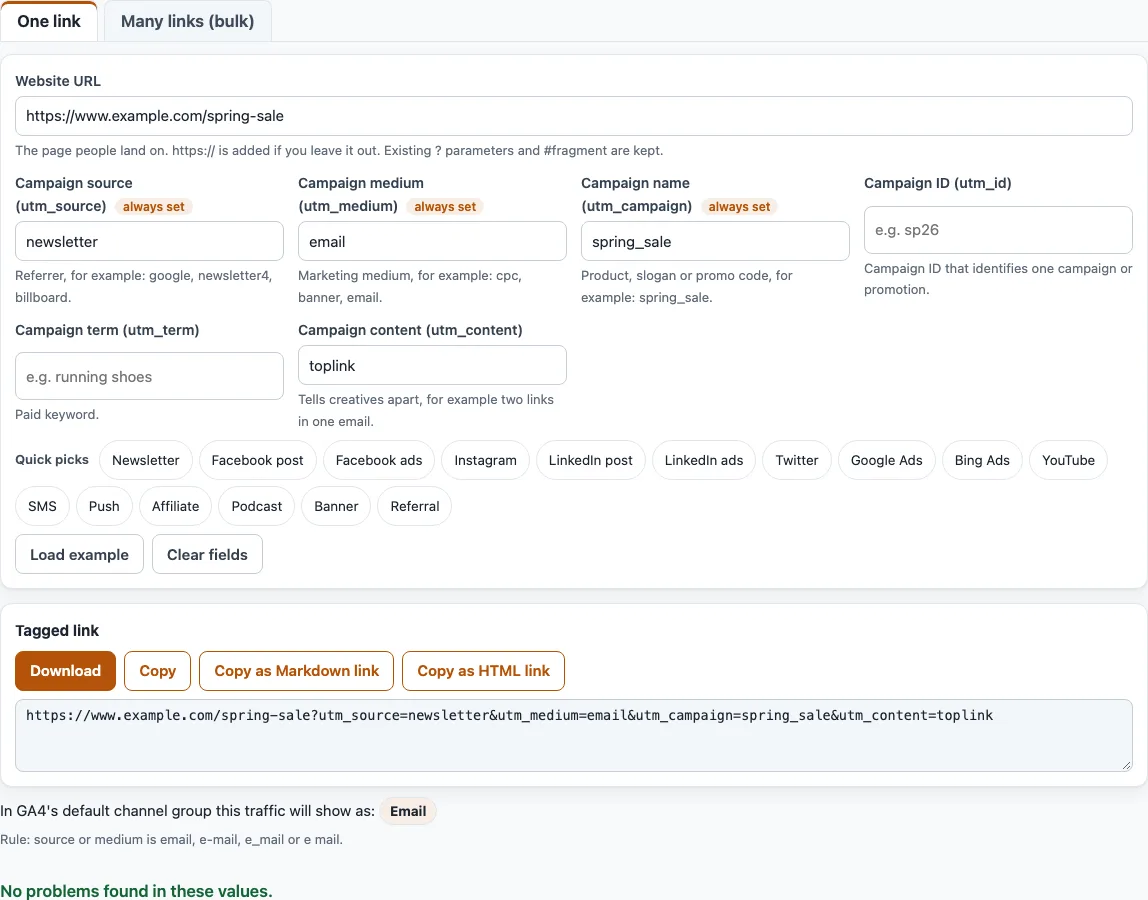
How to generate a UTM code with the UTM builder
- Stay on the “One link” tab, which is the default. To tag many URLs, open “Many links (bulk)” instead.
- Paste your page address into “Website URL”. If you leave out
https://, it is added. Existing?parameters and a#fragment are kept. Anyutm_tags already in the address are replaced, and the tool tells you which. - Fill in “Campaign source (utm_source)”, “Campaign medium (utm_medium)” and “Campaign name (utm_campaign)”. All three are marked “always set”. Under “Quick picks”, buttons such as “Newsletter” or “Google Ads” fill in the source and medium for you.
- Add “Campaign ID (utm_id)”, “Campaign term (utm_term)” or “Campaign content (utm_content)” only if you need them.
- Read the list under the “Tagged link” box. It says “No problems found in these values.” or names each problem.
- Check the line “In GA4’s default channel group this traffic will show as:”. It names the channel and the rule that matched.
- Click “Copy” or “Download” to take the link. “Copy as Markdown link” and “Copy as HTML link” give you ready-made link code.
“Load example” restores the sample values and “Clear fields” empties the form. Below the form, three options are kept in the page address. “Lower-case all values” is on by default. “Spaces in values” replaces spaces with - (the default) or _, or keeps them and writes them as %20 or +. “Keep existing parameters” is on by default; turn it off to drop the non-UTM query parameters of the address.
What is a UTM code?
A UTM code is a set of tags added to the end of a web address, such as utm_source, utm_medium and utm_campaign. When someone clicks the link, analytics tools read the tags and report which source, medium and campaign sent the visit. People also call this UTM coding or UTM tagging, and the finished link a UTM link. Without the tags, a click from a newsletter is hard to tell apart from other traffic.
What is a UTM builder, UTM maker or UTM creator?
A UTM builder writes the tags into your link so you do not have to type the separators yourself. A UTM maker, UTM creator, UTM generator or UTM code generator does the same job under another name. If you searched for a Google UTM builder or Google UTM creator, note that this is an independent tool, not made by Google. It uses the parameter names from Google’s help page.
The pattern is simple. A ? goes before the first tag, an & goes between tags, and an = sits inside each pair. The tags can come in any order.
Which fields should I fill in?
Google’s help says that when you add parameters to a URL, you should always use utm_source, utm_medium and utm_campaign. Those are the three fields marked “always set”. The other three are optional: utm_id, utm_term and utm_content. Google says missing UTM parameters show up as (not set) in reports.
Does case matter?
Yes. Google says parameter values are case sensitive, so utm_source=google is different from utm_source=Google, and it calls lowercase the standard practice. “Lower-case all values” is on by default, so the output is lowercased unless you turn it off. With the option off, the problem list flags capital letters.
How do I make a UTM link for a newsletter or social post?
Click a Quick pick. “Newsletter” sets the source to newsletter and the medium to email. “Facebook post”, “Instagram”, “LinkedIn post” and “Twitter” set the medium to social. Then type the campaign name, paste the page address and copy the link. With the sample address https://www.example.com/spring-sale and a campaign typed as “Spring Sale”, the result is:
https://www.example.com/spring-sale?utm_source=newsletter&utm_medium=email&utm_campaign=spring_sale
That output assumes “Spaces in values” is set to replace with _. With the default -, the campaign becomes spring-sale.
Can I make many UTM links at once?
Yes. Open “Many links (bulk)”. Set the defaults for source, medium and campaign, which apply to every row, then paste one URL per line or open a CSV or TSV file. A file needs a header row with a url column. It can also have source, medium, campaign, content, term and id columns, with or without the utm_ prefix. A value in a row beats the default.
You get the tagged URLs one per line, a count of the URLs tagged and of rows with problems, and a table of the first 200 rows with the columns URL, Tagged URL, GA4 channel and Problems. “Download CSV” saves a file with the columns url, tagged_url and channel. In our test, 10,000 URLs took about 0.25 seconds in the browser. Files are read locally and not uploaded.
Which GA4 channel will it show as?
The channel line applies the rules from Google’s “Default channel group” help page to your source, medium and campaign. With the default values it reads “In GA4’s default channel group this traffic will show as: Email”. Google’s page states no order of precedence, so the tool checks the rules in the order the page lists them; that is our reading, not a Google statement. The Quick picks land in Email, Organic Social, Paid Social, Paid Search, Organic Video, SMS, Mobile Push Notifications, Affiliates, Audio, Display and Referral.
Frequently asked questions
Is the UTM builder free?
Yes. It is free and needs no sign-up.
Are my links sent to a server?
No. Everything runs in your browser. The links, lists and numbers you enter are never uploaded, and the page never visits the links.
What happens to UTM tags already in my URL?
Any utm_ tags in the address are replaced by the values you enter, and the tool reports which ones. If you turn off “Keep existing parameters”, the non-UTM query parameters are dropped as well.
Why does the problem list flag my values?
It looks for missing or empty source, medium and campaign, capital letters, spaces, + signs, special characters, an e-mail address inside a value, values longer than 100 characters, and a source that equals the medium. Google does not set the special-character or 100-character limits. They are this tool’s own conventions.
Can I use it for Google Ads links?
Yes. The “Google Ads” Quick pick sets the source to google and the medium to cpc, and you can still edit both before copying.
What do the Markdown and HTML copy buttons give me?
“Copy as Markdown link” gives [spring_sale](url), with your campaign name as the link text. “Copy as HTML link” gives <a href="url">spring_sale</a>, with & written as &. If the campaign name is empty, the URL itself is used as the text.
Is this the official Google UTM builder?
No. It is an independent tool and is not affiliated with Google. The parameter names and the channel rules come from Google’s public help pages.
Related tools
- Campaign URL builder (GA4): all nine GA4 fields, with notes on the recommended ones.
- GA4 channel checker for UTM: paste many links or source and medium pairs and see their channels.
- URL builder: build any URL from name and value rows.
- UTM parameters explained: what each UTM parameter is for.
- UTM examples: sample tagged links for common channels.
- UTM link checker: decode and check a link that already has UTM tags.
- Email UTM builder: tag the links in an email campaign.