AB Test Sample Size Calculator
Enter your baseline conversion rate and the smallest lift worth detecting to get the visitors needed per variant, the total, and how many days the test takes at your traffic.
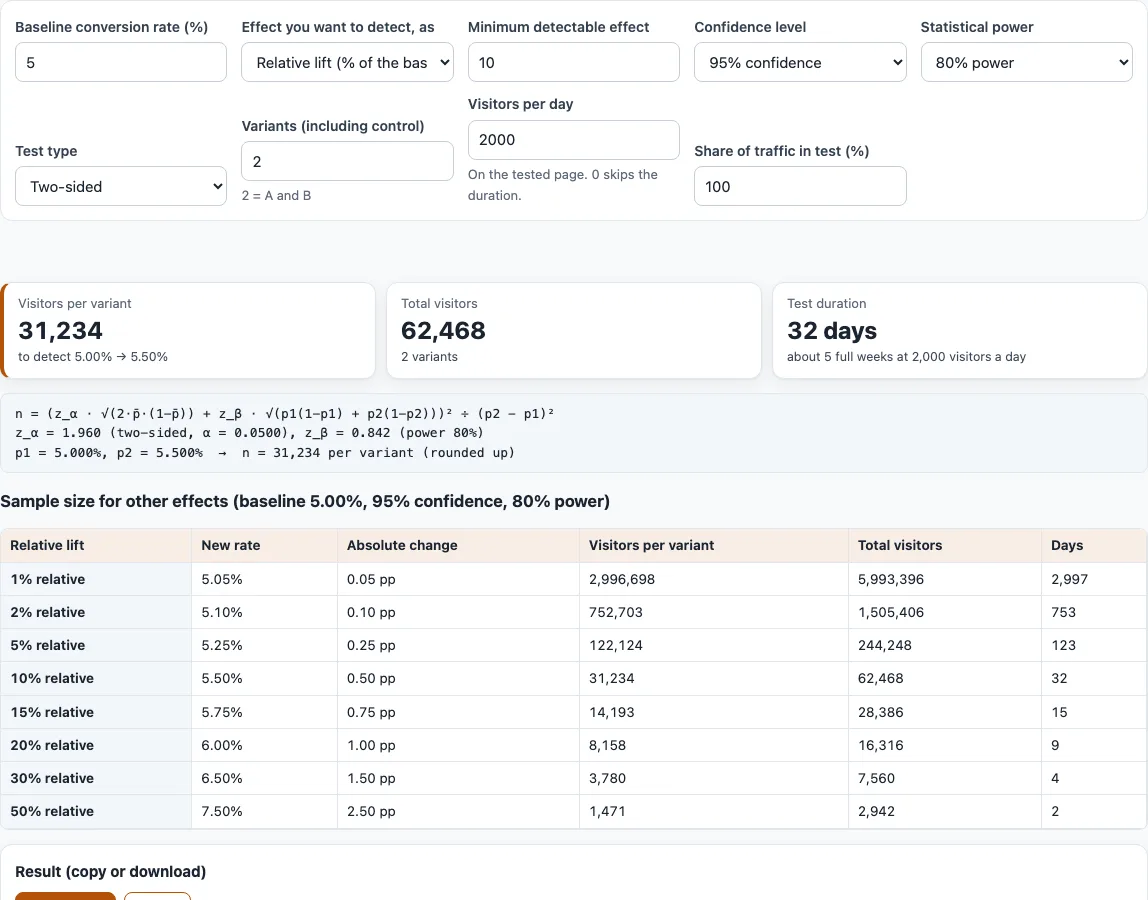
How to use the A/B test sample size calculator
- Enter the “Baseline conversion rate (%)”. The default is 5.
- Under “Effect you want to detect, as”, choose “Relative lift (% of the baseline)” (the default) or “Absolute change (percentage points)”.
- Set the “Minimum detectable effect”. The default is 10, read as a percent of the baseline or as percentage points, depending on step 2.
- Pick a “Confidence level” (90%, 95% or 99%; default 95%) and a “Statistical power” (70%, 80%, 90% or 95%; default 80%).
- Choose the “Test type”: “Two-sided” (the default) or “One-sided (B beats A)”.
- Set “Variants (including control)”. The default is 2, meaning A and B, and the field accepts 2 to 10. Above 2, the checkbox “Correct for several variants (Bonferroni)” appears and is on by default.
- Enter “Visitors per day” on the tested page (default 2000). Set it to 0 to skip the duration.
- Set “Share of traffic in test (%)”. The default is 100.
- Read “Visitors per variant”, “Total visitors” and “Test duration”. The formula with your numbers is shown below the cards.
A table underneath shows relative lifts of 1, 2, 5, 10, 15, 20, 30 and 50 %, with the new rate, absolute change, visitors and days for each. Rows whose new rate would pass 100 % are left out. Use Copy or Download to save the result text. Your settings stay in the page address, so bookmarking it keeps them.
How many visitors do I need for an A/B test?
The number depends on four things: your baseline rate, the change you want to detect, the confidence level and the power. The tool uses a normal approximation, with equal group sizes: n = (z_(1-a/sides) * sqrt(2 p̄ (1-p̄)) + z_power * sqrt(p1(1-p1) + p2(1-p2)))^2 / (p2-p1)^2, rounded up, where p̄ = (p1+p2)/2. The variance uses the pooled rate under the null hypothesis and the separate rates under the alternative. This is the same method as R’s power.prop.test and the statsmodels function power_proportions_2indep. With the defaults (5 % baseline, +10 % relative so 5.5 %, 95 % two-sided, 80 % power, 2 variants), you need 31,234 visitors per variant and 62,468 in total.
How long should an A/B test run?
Duration is the total visitors needed divided by the daily visitors multiplied by the share in the test, rounded up to whole days. In the default example, 62,468 / 2,000 = 31.23, so the test runs 32 days. Dividing by 7 and rounding up gives 5 weeks. Many practitioners round up to whole weeks so that every weekday is covered equally; that is a convention, not a rule. If only half of your traffic enters the test, the same example takes 63 days.
What is statistical power?
Power is the probability that your test detects a real effect of the size you set. At 80 % power, if the true lift equals the minimum detectable effect, the test will catch it in about 4 out of 5 runs and miss it in the other one. Higher power needs more visitors: at 90 % power the example needs 41,813 per variant. Confidence level controls false positives; at 95 % two-sided, the significance level of 0.05 is split across both tails.
Why does a small lift need so many visitors?
The difference appears squared in the denominator, (p2-p1)^2. Halving the effect roughly quadruples the visitors needed. At a 5 % baseline, a 1 % relative lift needs 2,996,698 visitors per variant, a 5 % lift needs 122,124 and a 10 % lift needs 31,234. A small difference is hard to separate from random variation between the groups, so it takes a large sample to see it.
Relative or absolute lift?
Relative lift is a percent of the baseline. At 5 %, a 10 % relative lift moves the rate to 5.5 %, a change of 0.5 percentage points. Absolute change adds percentage points directly, so +0.5 points gives the same 5.5 %. Choose relative when you think in proportional improvements, and absolute when you know the exact rate change you need.
Do more variants need more traffic?
Yes. Total traffic is visitors per variant multiplied by the number of variants. With the Bonferroni checkbox on, the significance level is divided by the number of comparisons with the control, so each variant needs more visitors. At a 5 % baseline with a 10 % relative lift, 3 variants need 37,824 per variant and 113,472 in total, compared with 31,234 and 62,468 for 2 variants.
Frequently asked questions
How do I calculate sample size for an A/B test?
Enter your baseline conversion rate, the effect you want to detect, your confidence level and power, and your variant count. Then read visitors per variant and, if you enter daily visitors, the duration in days and weeks. The steps above cover each control.
Does the sample size include stopping early?
No. The figure does not adjust for stopping early, sequential testing or non-converting traffic. Methods designed for early stopping need their own calculation.
Can I use this for a one-sided test?
Yes. Set “Test type” to “One-sided (B beats A)”. The z value then uses the full significance level in one tail instead of splitting it across two. For the default example this lowers the need from 31,234 to 24,603 visitors per variant. Decide on a one-sided test before the test starts.
What makes the calculator show an invalid result?
The inputs are invalid when the baseline is not between 0 and 100 %, the effect is 0, the new rate would not stay between 0 and 100 %, or there are fewer than 2 variants. The page shows a message instead of numbers.
Where do I get my baseline conversion rate?
Divide conversions by visitors over a recent, normal period for the page you will test. The conversion rate calculator on this site does that for you. Use the same definition of a visitor and a conversion that you will use during the test.
Does the duration account for weekends or seasons?
No. The duration is only the total visitors divided by your daily visitors in the test. If your traffic changes by weekday, the days shown are a rough guide, which is why the tool also shows the number of full weeks.
Can I save or share my settings?
Yes. Copy or download the result text, or share the page address, which holds all of your settings.
Related tools
- Conversion rate calculator: use it to work out your baseline rate from visitors and conversions before you enter it here.
- A/B test significance calculator: use it after a test has finished to check whether the difference in results is statistically significant.
- Minimum detectable effect calculator: use it when you know your traffic and want to find the smallest effect you could detect.
- utm_content variant tagger: use it to tag each variant’s links with
utm_contentso you can tell them apart in analytics. - UTM builder: use it to build tagged campaign links for the pages in your test.