AB Test Significance Calculator (A/B Split Test)
Enter visitors and conversions for A and B, and optionally C and D, to see the uplift with its range, the p-value and a plain-words verdict on whether the difference is statistically significant.
How to use the A/B test significance calculator
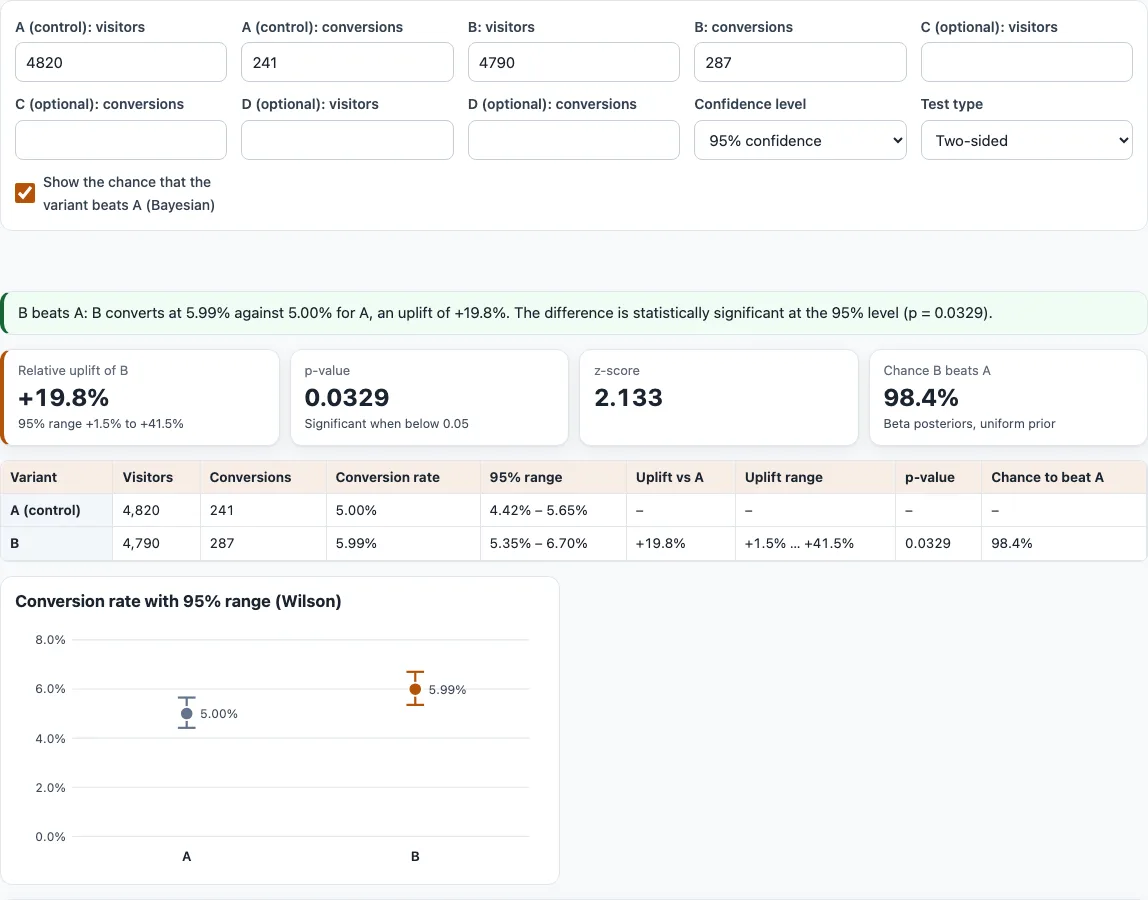
- Enter “A (control): visitors” and “A (control): conversions”. The defaults are 4820 visitors and 241 conversions.
- Enter “B: visitors” and “B: conversions”. The defaults (4790 and 287) are an example, so replace them with your own numbers.
- Optionally fill in the “C (optional)” and “D (optional)” fields. Only then does the checkbox “Correct for several variants (Bonferroni)” appear.
- Choose a “Confidence level”: “90% confidence”, “95% confidence” (the default) or “99% confidence”.
- Choose the “Test type”: “Two-sided” (the default) or “One-sided (B beats A)”.
- Keep “Show the chance that the variant beats A (Bayesian)” ticked to see the Bayesian chance, or untick it to hide it.
- Read the verdict sentence for each variant against A: it beats A, loses to A, or shows no significant difference.
- Check the cards for the first challenger: “Relative uplift of B” with its range, “p-value”, “z-score” and the Bayesian chance.
- Compare the table, which lists each group’s visitors, conversions, conversion rate and Wilson range, plus the uplift vs A, uplift range, p-value and chance to beat A. The chart below it shows each rate with its range.
- If an error message appears, fix the named problem. Nothing is calculated until the inputs are valid.
Your settings are kept in the page address, so you can bookmark or share the link to reopen the same set-up. Use Copy or Download under “Result (copy or download)” to save the results as text.
What is statistical significance in A/B testing?
Statistical significance means a difference between A and B would be unlikely if only chance were at work, judged against a threshold you set in advance. In this tool the threshold is 1 minus your confidence level, so a result is called significant when p is below 0.10 at 90 %, below 0.05 at 95 % and below 0.01 at 99 %. A significant result is evidence against “no difference”, not proof of a lasting gain.
How do I calculate A/B test significance?
The calculator uses a two-proportion z-test with a pooled standard error. First pool the rates: p = (conversions A + conversions B) / (visitors A + visitors B). Then compute z = (p_B - p_A) / sqrt(p(1-p)(1/n_A + 1/n_B)). The two-sided p-value is 2(1 - Phi(|z|)) and the one-sided p-value is 1 - Phi(z). This matches the chi-square test of the 2x2 table without continuity correction, because chi2 = z^2. It is a large-sample approximation. For 241 conversions of 4,820 against 287 of 4,790, z = 2.133 and the two-sided p = 0.0329, so B is significant at 95 % but not at 99 %.
What does p = 0.03 mean?
A p-value of 0.03 means that if A and B truly converted at the same rate, a gap at least this large would appear in about 3 of 100 repeated tests of the same size. It is not the probability that B is better. In the example, p = 0.0329 is below 0.05, so the result is significant at 95 %.
One-sided or two-sided?
A two-sided test checks whether B differs from A in either direction, and it is the default. A one-sided test (“One-sided (B beats A)”) checks only whether B is higher, so it gives a smaller p-value for the same data: 0.0165 instead of 0.0329 in the example. Decide on one-sided before you see the data, and only if a worse B would not change your action. Even in one-sided mode, the uplift range is two-sided at your chosen confidence.
What if the result is not significant?
A non-significant result means the data cannot rule out chance. It does not prove that A and B perform the same: the true difference may be real but too small to detect with this many visitors. Look at the uplift range. If it is wide and includes both losses and gains, more data would narrow it. Do not stop a test early just because a p-value looks good at one moment; decide the sample size first. The A/B test sample size calculator estimates how many visitors each version needs.
What is the uplift range?
The uplift is the relative change p_B/p_A - 1. In the example it is +19.8 %, with a 95 % range of +1.5 % to +41.5 %, found with the log-ratio method on p_B/p_A. The range for each conversion rate itself is a Wilson interval. If the uplift range includes zero, the data does not clearly show a gain or a loss; at 99 % the example range runs from -3.7 % to +49.1 %.
Is the Bayesian chance the same as significance?
No. The Bayesian chance is the probability that B’s true rate is higher than A’s. It uses independent Beta(1+conversions, 1+non-conversions) posteriors with a uniform prior, computed by numerical integration. It is not the p-value and does not answer “is it significant”. In the example the chance is 98.4 % while the p-value is 0.0329. Use the p-value for the significance verdict.
Can I test more than two variants?
Yes. Each challenger (B, C and D) is compared with A. Every extra comparison raises the risk of a false positive, so when C or D is filled in, the Bonferroni checkbox appears and is on by default. Bonferroni multiplies each p-value by the number of comparisons (capped at 1) and widens the ranges to confidence 1 - (1-conf)/m. It is conservative, so real differences can be missed. Adding a C of 262 conversions from 4,800 visitors raises B’s p-value from 0.0329 to 0.0658. The comparison of C with D is not shown.
Frequently asked questions
Does this calculator upload my numbers?
No. Everything runs in your browser. The visitor and conversion numbers you enter are never sent anywhere.
Why won’t the calculator show a result?
It needs valid inputs. The page names the problem if conversions are higher than visitors, if a number is not whole or visitors are not above 0, or if A or B is missing. Nothing is calculated until you fix it.
Which confidence level should I choose?
The default is 95 %, and 90 % and 99 % are also available. A higher level makes the threshold stricter, so fewer results will be significant: the example passes at 95 % and not at 99 %. Choose your level before you look at the results.
Why does one variant show “no significant difference” when its rate is higher?
A higher observed rate can still be within what chance produces at your sample size. The verdict compares the p-value with 1 minus your confidence level. Collect more data or accept that the change makes no measurable difference.
Can I use it for a split test of two emails or ads?
Yes. Any two groups work, as long as each visitor is counted once and conversion is a yes-or-no outcome. Enter the number reached as visitors and the number who converted as conversions.
Can I save or share my results?
Yes. Use Copy or Download to save the results as text. Your settings also stay in the page address, so the link reopens with the same inputs.
Related tools
- Conversion rate calculator: use it to work out the conversion rate of each version before you enter the numbers here.
- A/B test sample size calculator: use it before a test to estimate how many visitors each version needs.
- Minimum detectable effect calculator: use it to find the smallest uplift your test can reliably detect with a given sample.
- utm_content variant tagger: use it to label links for each variant so you can tell them apart in your analytics.
- UTM builder: use it to build tagged campaign links for the pages you test.