Conversion Rate Calculator
Enter conversions and visitors to get your conversion rate with a 95% range, revenue per visitor, or work backwards to the conversions or visitors a target rate needs.
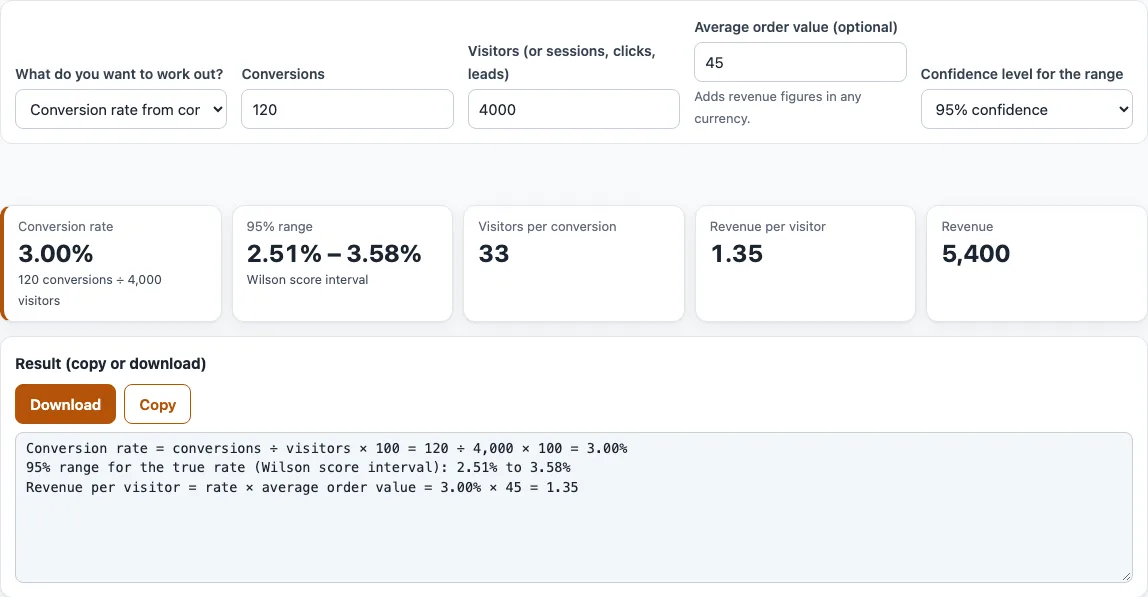
How to use the conversion rate calculator
- Under “What do you want to work out?”, choose one of three options. The default is “Conversion rate from conversions and visitors”. The others are “Conversions needed for a target rate” and “Visitors needed for a number of conversions”.
- For a conversion rate, enter completed goals in “Conversions” and your traffic in “Visitors (or sessions, clicks, leads)”. Both must be whole numbers, visitors must be above zero, and conversions cannot be more than visitors.
- In this mode, also pick the “Confidence level for the range”: 90, 95 or 99 %. The default is 95 %. The other modes do not show this field.
- For a target, enter “Conversion rate (%)”. In “Conversions needed for a target rate” also enter “Visitors (or sessions, clicks, leads)”. In “Visitors needed for a number of conversions” enter “Conversions you want” instead.
- Optionally enter “Average order value (optional)” in any currency. Revenue figures then appear; the tool does not apply exchange rates.
- Read the result cards: the conversion rate, the range, visitors per conversion, revenue per visitor and revenue. Counts that the target modes calculate are rounded up.
- Use Copy or Download under “Result (copy or download)” to keep the result text as
conversion-rate.txt.
Your settings are kept in the page address, so bookmarking or sharing the address brings back the same inputs.
What is the conversion rate formula?
The conversion rate is conversions divided by visitors, multiplied by 100: conversion rate = conversions / visitors x 100. The result is a percentage. For example, 120 conversions from 4,000 visitors gives 120 / 4000 x 100 = 3.00%.
Use the same measure for both numbers. If you count sessions, count conversions per session, not per person. Pick one denominator (visitors, sessions, clicks or leads) and keep it the same each time you compare.
The tool also reports related figures. Visitors per conversion is visitors divided by conversions, so 4000 / 120 is about 33.3. Revenue per visitor is the rate multiplied by the average order value, and revenue is conversions multiplied by that value. With an order value of 45, the example gives 1.35 per visitor and 5,400 in total.
Why is there a range?
A conversion rate measured from one group of visitors is an estimate. Another group of 4,000 visitors might convert slightly more or less. The range shows the true rates that are consistent with the data you entered.
The tool uses the Wilson score interval, introduced by E. B. Wilson in 1927. Compared with the simpler Wald interval, its coverage is closer to the stated confidence level, it never has zero width at 0 % or 100 %, and it stays between 0 and 100 %. Its centre is (p + z^2/2n) / (1 + z^2/n), where p is the observed rate, n is the number of visitors and z is the normal value for the confidence level.
For 120 conversions from 4,000 visitors, the 95 % range is 2.51 % to 3.58 %. At 90 % it is 2.59 % to 3.48 %, and at 99 % it is 2.38 % to 3.78 %. Fewer visitors give a much wider range: 12 conversions from 400 visitors is the same 3.00 % rate, but the 95 % range is 1.72 % to 5.17 %.
How do the target modes work?
“Conversions needed for a target rate” multiplies visitors by the target rate and rounds up: 4,000 visitors at 4 % need 160 conversions. “Visitors needed for a number of conversions” divides conversions by the rate and rounds up: 200 conversions at 4 % need 5,000 visitors. Both add revenue at that volume when you enter an order value.
Frequently asked questions
How do I calculate conversion rate?
Divide conversions by visitors and multiply by 100. For 120 conversions from 4,000 visitors, the result is 3.00%. Enter the two numbers in “Conversions” and “Visitors (or sessions, clicks, leads)”, and the tool does the calculation.
Is this a currency conversion rate calculator?
No. This page works out the marketing conversion rate, which is the share of visitors who complete a goal. It does not convert money between currencies. The optional “Average order value (optional)” only lets you see revenue in whatever currency you use, and no exchange rates are applied.
What is a good conversion rate?
This page does not give a benchmark, because no single figure suits every traffic source and goal. Compare your rate with your own earlier results, measured the same way, and look at the range as well as the single number.
Why does the range change when I change the confidence level?
A 99 % level aims for more certainty about where the true rate sits, so the range widens. A 90 % level gives a narrower range with less certainty. The conversion rate itself does not change.
How many visitors do I need to reach a set number of conversions?
Choose “Visitors needed for a number of conversions”, then enter “Conversions you want” and “Conversion rate (%)”. At a 4 % rate, 200 conversions need 5,000 visitors. The result is rounded up.
What are the limits on the numbers?
In rate mode, conversions and visitors must be whole numbers, visitors must be above 0, and conversions must be between 0 and the number of visitors. In the target modes, the rate must be between 0 and 100 %. The tool shows a message when an input is outside these limits.
Can I save my results?
Yes. Copy the result text or download it as conversion-rate.txt. Your settings also stay in the page address, so you can return to the same inputs.
Related tools
- A/B test significance calculator: use it to check whether two conversion rates differ by more than chance would explain.
- A/B test sample size calculator: use it to work out how many visitors each version needs before you start a test.
- Minimum detectable effect calculator: use it to find the smallest change in rate your test could reliably detect.
utm_contentvariant tagger: use it to label each version of a link so you can see which one converts.- UTM builder: use it to build tagged campaign links that send traffic to your goal page.