Facebook UTM Parameters Builder for Meta Ads
Build the string for the URL parameters field of your Facebook and Instagram ads with Meta's dynamic parameters, and see the resolved link with sample values.
utm_source, utm_medium, utm_campaign and more. Pick a recommended set or fill in each field, add Meta’s dynamic parameters with one click, and copy the finished string. A second box shows the resolved link with sample values, and a list of checks flags empty values, duplicate keys, unknown dynamic parameters and stray braces before you publish. It runs in your browser, is free and needs no sign-up, and your settings stay in the page address.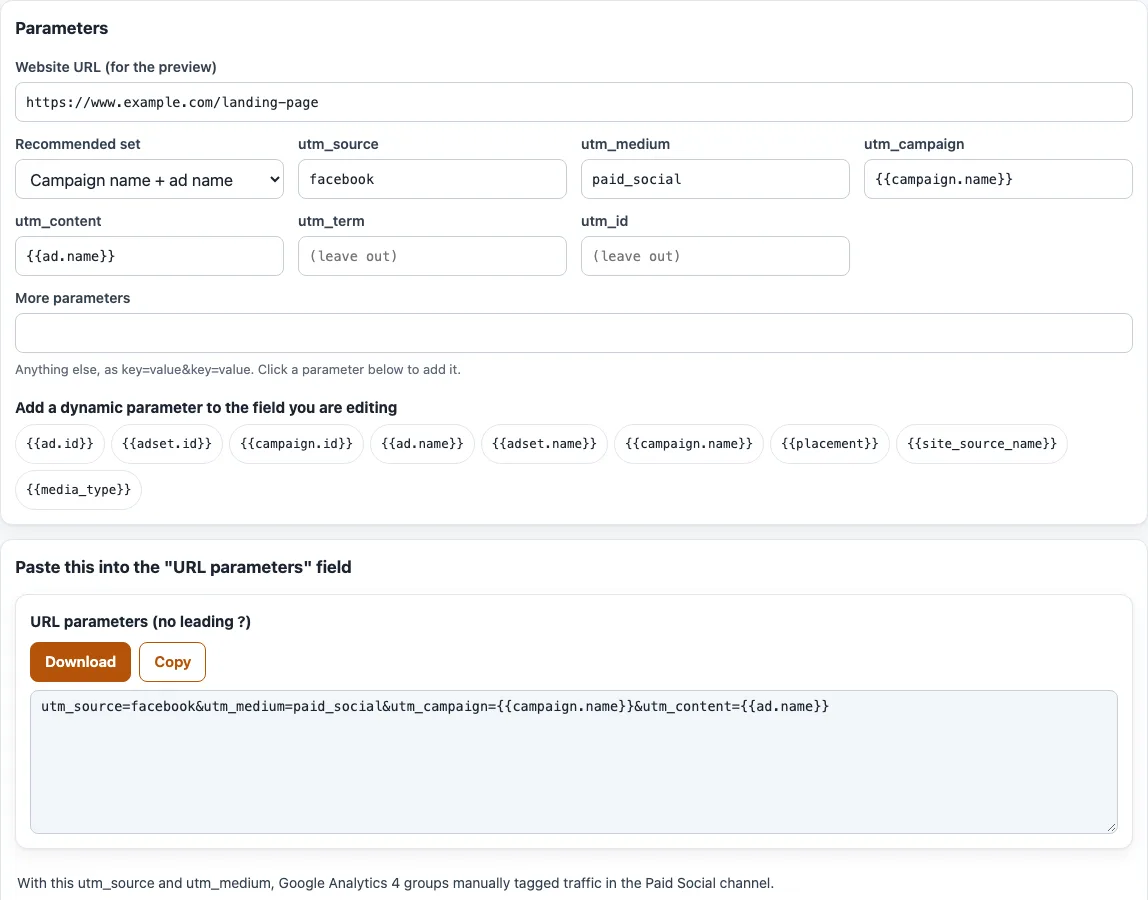
How to build Facebook ad URL parameters
- Type your landing page in “Website URL (for the preview)”. It is used only for the preview and is never part of the string you copy.
- Open “Recommended set” and choose one. The default is “Campaign name + ad name”. The other sets are “Campaign, ad set and ad names”, “IDs only”, “Names + placement” and “Everything (UTM + placement + site source)”.
- Edit
utm_source,utm_medium,utm_campaign,utm_content,utm_termandutm_idif you want different values. A field left empty is left out of the string. - To add a dynamic parameter, click inside the field you want, then click one of the buttons under “Add a dynamic parameter to the field you are editing”. It is inserted where your cursor is. In “More parameters” it is added as a
key=valuepair, for examplead_idwith the ad ID macro. - Use “More parameters” for anything else, written as
key=value&key=value. - Read the checks under the output and fix what they flag.
- Press Copy or Download under “URL parameters (no leading ?)”, then paste the text into the “URL parameters” field under Tracking when you create the ad.
- Open “Resolved example URL” to see the full link with sample values.
Every field is stored in the page address, so bookmarking the page keeps your setup.
What are Facebook dynamic URL parameters?
Dynamic URL parameters are macros, written in double curly braces, that Meta replaces with real details when your ad is delivered. Meta documents nine: ad_id, adset_id, campaign_id, ad_name, adset_name, campaign_name, placement, site_source_name and media_type. Each one is the name of the parameter plus a macro such as campaign.name or placement in double braces. media_type is for Advantage+ catalog ads only. The tool lists all nine in a collapsible table under the builder.
Where do I paste them?
Paste the string from “URL parameters (no leading ?)” into the “URL parameters” field under Tracking when you create an ad in Meta Ads Manager. Leave out the leading ?: Meta joins each key and value with = and separates several pairs with &, then appends them to your website URL. Awareness campaigns with Store Locations and Sales campaigns with a catalog have only this field and no website URL. App promotion has no separate field, so you add the dynamic parameters to the end of the deferred deep link.
Which utm values should I use for Facebook ads?
Meta documents utm_campaign with the campaign name macro and utm_content with the ad name macro as a Google Analytics example. The source and medium values are your choice. The “Campaign name + ad name” set uses utm_source=facebook and utm_medium=paid_social; these are our suggestions, not Meta’s. Keep every value lowercase, because GA4 treats Meta and meta as different values. Since 1 January 2024 Meta also adds campaign source (Facebook or Instagram), campaign medium (paid) and ID parameters to ad traffic by itself, so choose values that suit your own reports.
Do spaces in campaign names break the link?
Meta shows spaces in resolved names as %20: a campaign called “Prospecting 2026” appears as Prospecting%202026, and the preview does the same with its sample names. The check for spaces fires only when you type a literal space into a key or value; use a dash or an underscore there.
Can I change the campaign name later?
Not in the parameter. Name-based parameters keep the name used when the campaign, ad set or ad was first published, even if you rename it afterwards. To use a new name, create and publish a new campaign, ad set or ad. You can edit the URL parameters after publishing, but Meta says this may cause your ad set to re-enter the learning phase.
Which placement values will I see?
The placement macro resolves to one of: audience_network_classic, audience_network_rewarded_video, facebook_feed, facebook_instream, facebook_marketplace, facebook_right_column, instagram_feed, instagram_stories, messenger_inbox, messenger_sponsored_messages or threads_stream. The site_source_name macro resolves to an, fb, ig, msg or th. From March 2026 the Facebook Feed placement includes the Facebook Friends tab. Meta does not support dynamic URL parameters for ads in collection format on Instagram placements.
Do URL parameters override those in my website URL?
Yes. When the same key is in both places, the one in the “URL parameters” field wins. With utm_source=1 in the website URL and utm_source=2 in the field, only utm_source=2 is in the final URL. The preview shows the replacement and names the keys. Parameters set in Ads Manager also override those set elsewhere, such as Instagram’s default URL parameters.
Frequently asked questions
Is anything I enter uploaded anywhere?
No. The page builds the string in your browser and sends nothing anywhere. It never opens the website you type.
What does “Custom (edited)” mean?
You changed a field after choosing a set, so the values no longer match any of the five sets. Editing any field switches “Recommended set” to “Custom (edited)”. If you type values that match a set again, the select goes back to that set.
Are the sets official Meta settings?
No. The sets are our suggestions. Meta documents only the campaign name and ad name example for Google Analytics. This site is not affiliated with Meta or Google.
Can I leave a value empty?
Not in the string. Meta says every parameter key needs a value, so add one or remove the parameter. Empty fields in the builder are left out, and the check “has no value” fires for an empty pair typed into “More parameters”.
Does a URL parameter follow the visitor around my site?
No. Meta says a URL parameter applies only to the first product page, and is lost if the visitor leaves and comes back on their own. On an existing Facebook post that links off Facebook, the parameters apply only to clicks on the ad, not to organic clicks.
Do I still need analytics to see results?
Yes. The builder only makes the string. You still need a website analytics tool to see the results of your ad clicks.
What does the catalog-only note mean?
The media_type macro is documented for Advantage+ catalog ads only. Remove it from other ads.
Related tools
- Google Ads UTM parameters: use this when your paid clicks come from Google Ads instead of Meta.
- UTM builder: use this to build general UTM links for any channel.
- utm_term keyword encoder: use this when you need to encode keyword text for
utm_term. - utm_content variant tagger: use this when you test several versions of an ad or link.
- utm_source helper: use this when you need a consistent source name across campaigns.
- GA4 channel checker for UTM: use this to see which GA4 channel a source and medium fall into.