Google Ads UTM Parameters: Final URL Suffix and Tracking Template
Build a Final URL suffix and a tracking template with ValueTrack and custom parameters, check them, and see the landing page URL with sample values.
{lpurl}, and the custom parameters you need to create, all ready to copy into Google Ads. Start from a recommended set or type your own utm_source, utm_medium, utm_campaign, utm_content, utm_term and utm_id values, insert ValueTrack parameters with one click, and read the checks for unbalanced braces, unknown parameters and spaces. You can also paste a tracking template you already use and have it checked. It runs in your browser, is free and needs no sign-up, and nothing you enter is sent anywhere.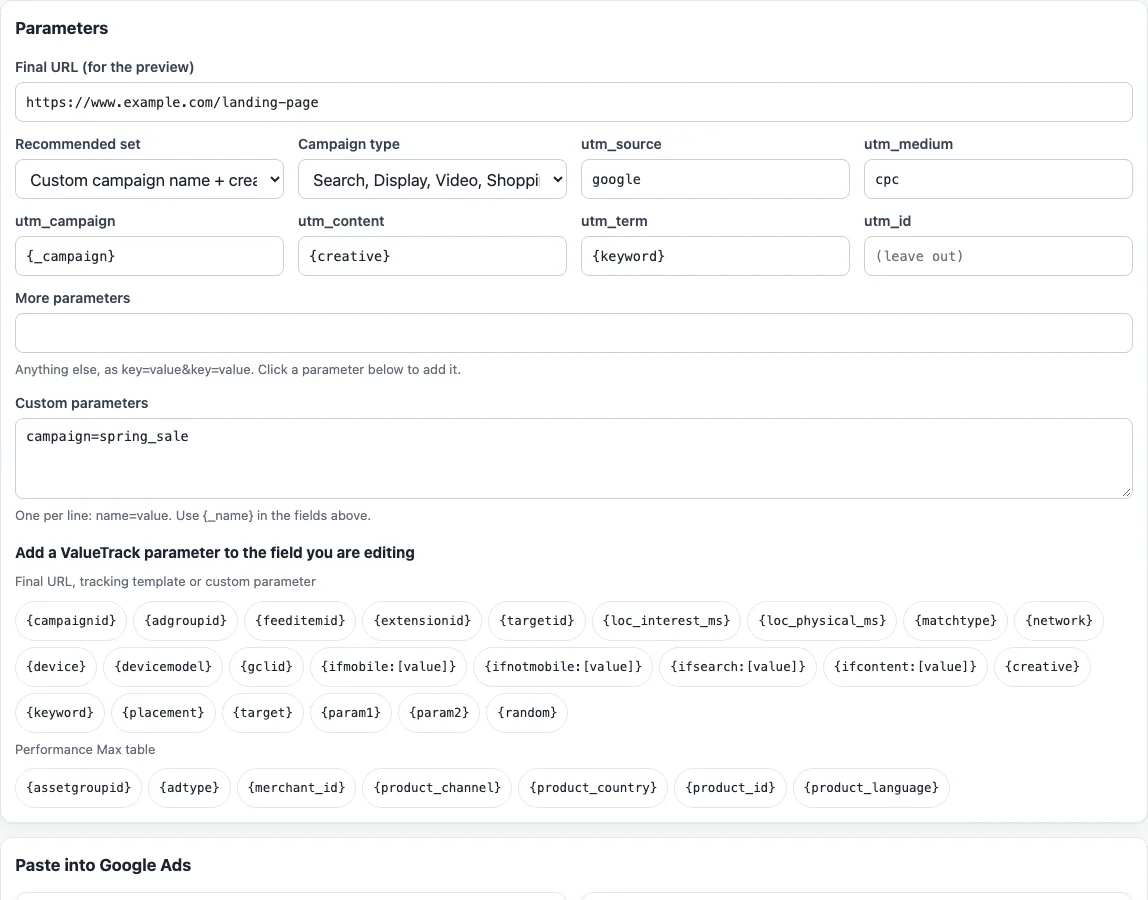
How to build a Final URL suffix and tracking template
- Choose a “Campaign type”: “Search, Display, Video, Shopping”, “Demand Gen” or “Performance Max”. The type changes only the warnings, such as the ValueTrack parameters Demand Gen does not support.
- Enter your landing page in “Final URL (for the preview)”. It is used only for the two resolved examples.
- Pick a “Recommended set”. The default is “Custom campaign name + creative + keyword”; the others are “IDs and keyword” and “Detailed (match type, network, device, ad group)”. Editing any field switches the select to “Custom (edited)”.
- Edit
utm_source,utm_medium,utm_campaign,utm_content,utm_termandutm_id. Use “More parameters” for rawkey=value&key=valuepairs and “Custom parameters” for onename=valueper line. Click a button under “Add a ValueTrack parameter to the field you are editing” to insert a ValueTrack parameter. - Read the checks. They flag unbalanced braces, unknown parameters, tracking-template-only parameters in the suffix, spaces and empty values. The tool also shows which GA4 channel a static source and medium fall into, for example
googlepluscpcfor Paid Search. - Under “Paste into Google Ads”, press Copy or Download for “Final URL suffix” and “Tracking template”. Do the same for “Custom parameters to create” if you used any.
- Compare the examples under “What the landing page URL looks like” with what you expect.
To test a template you already have, paste it into “Check an existing tracking template”. Your settings are kept in the page address.
What is a Google Ads tracking template?
A tracking template is a URL pattern Google Ads uses for each click. It must include a ValueTrack parameter that inserts your final URL, such as {lpurl}, and can add other parameters after it, for example {lpurl}?campaignid={campaignid}&device={device}. Google describes tracking templates as an advanced feature, used mainly with third-party click trackers. Google Ads uses the most specific template: keyword, then ad, ad group, campaign and account.
Final URL suffix or tracking template for UTM parameters?
You can use either, and the tool outputs both. A Final URL suffix is a string added to the end of your landing page URL, for example utm_source=google&utm_medium=cpc. A tracking template contains {lpurl} and the parameters after it, for example {lpurl}?utm_source=google&utm_medium=cpc. Google’s ValueTrack page groups parameters as usable in a final URL, tracking template or custom parameter, tracking template only, or final URL only. It does not say which work in the suffix field, so the tool warns about tracking-template-only ones there.
Which ValueTrack parameters exist?
ValueTrack parameters are placeholders in curly braces, such as {campaignid}, {adgroupid}, {keyword}, {device}, {matchtype}, {network} and {creative}. Google Ads replaces each one with a value for that click. The tool covers 23 that work in a final URL, tracking template or custom parameter, the {lpurl} family for templates, {ignore} for final URLs, and the Performance Max table. Shopping, Video and Hotel campaigns have their own lists, which the tool does not offer. Demand Gen does not support {placement}, {target}, {keyword}, {ifsearch:[value]}, {ifcontent:[value]}, {network} or {targetid}.
Can I use the campaign name in UTM?
ValueTrack has {campaignid}, which is the ID, but no parameter for the campaign name. Use a custom parameter instead: create {_campaign} with the value spring_sale, then write utm_campaign={_campaign}. Google Ads replaces the name with your value after a click. A custom parameter name can have up to 16 letters or digits, a value up to 250 characters, and you can define up to 8 at any level except the account level. If one name is set at several levels, the most specific wins.
How do I add UTM to Google Ads when auto-tagging is on?
Auto-tagging adds gclid to the landing page URL, and Google recommends it as the way to get the most detailed Google Ads data. Google’s Analytics help says that when you use manual and auto-tagging together, the source, medium and other traffic-classification dimensions use the auto-tagged values, while your utm_content and utm_term fill the Manual Ad Content and Manual Term dimensions. An older Universal Analytics article advised turning auto-tagging off when using manual tags; it was not confirmed for GA4, so check your own property.
Why does my landing page break?
Tracking templates at account, campaign or ad group level must include a ValueTrack parameter that inserts the final URL, such as {lpurl}. Without one, Google says your landing page URL will break. Dynamic Search Ads and auto-targets need this at every level. For AI Max, Google advises writing ?, & or # after {lpurl}, or nothing. A static URL without {lpurl}, or {lpurl} used as only part of a value such as foo={lpurl}value, can send users to a static URL or cause 404s on AI Max dynamic landing pages.
What about spaces in keywords?
Do not type spaces into parameter values. Google says spaces break URLs and tracking will not work. A %20 in the data stands for a space, which is how two-word keywords appear. The tool’s checks flag a space in the string you build.
Frequently asked questions
Does this tool send my links anywhere?
No. The page builds the strings in your browser and sends nothing anywhere. It never opens your final URL.
What does “Custom (edited)” mean?
The recommended sets are our suggestions, not Google’s. When you change a field, the select switches to “Custom (edited)”.
Do I need my ads reviewed again after I change the Final URL suffix?
It depends on the level. Google says changes to the suffix at account, campaign or ad group level do not need ads to be re-reviewed, while changes at ad, keyword or sitelink level do.
How long do tracking template changes take to show?
Changes to tracking templates take 24 to 48 hours to be reflected in serving.
Should the template start with http or https?
Use https://. With parallel tracking, all redirect URLs need HTTPS and redirects must be server-side. The template check warns about http://.
Which campaign types does the tool cover?
The “Campaign type” select offers “Search, Display, Video, Shopping”, “Demand Gen” and “Performance Max”. It changes only the warnings, not the strings. Google lists separate parameters for Shopping, Video and Hotel campaigns, and the tool does not offer those.
Does the tool pick utm_source and utm_medium for me?
The sets use google and cpc, a common convention, but Google does not document required values. Keep them lowercase and the same across campaigns. This site is not affiliated with Google or Meta.
Related tools
- Facebook UTM parameters: use this when you need UTM parameters for Facebook ads instead of Google Ads.
- UTM builder: use this to build a standard UTM link from your own source, medium, campaign, content and term values.
- utm_term keyword encoder: use this to encode keyword text before you place it in
utm_term. - utm_content variant tagger: use this to tag and label different versions of an ad in
utm_content. - utm_source helper: use this when you need help choosing a clear
utm_sourcevalue. - GA4 channel checker: use this to see which GA4 channel a UTM source and medium pair falls into.