Minimum Detectable Effect (MDE) Calculator
Enter your baseline conversion rate and your traffic to see the smallest lift an A/B test can reliably detect, and how that shrinks week by week.
How to use the minimum detectable effect calculator
- Enter the “Baseline conversion rate (%)”. The default is 3.
- Under “How much traffic do you have?”, choose “Daily visitors × days” (the default) or “Visitors per variant”.
- In the first mode, set “Visitors per day” (on the tested page, all variants together; default 1500), “Share of traffic in test (%)” (default 100) and “Test length (days)” (default 14). In the second mode, set “Visitors per variant” instead (default 10000).
- Pick a “Confidence level” (90%, 95% or 99%; default 95%) and a “Statistical power” (70%, 80%, 90% or 95%; default 80%).
- Choose the “Test type”: “Two-sided” (the default) or “One-sided (B beats A)”.
- Set “Variants (including control)”. The default is 2 and the field accepts 2 to 10. Above 2, the checkbox “Correct for several variants (Bonferroni)” appears.
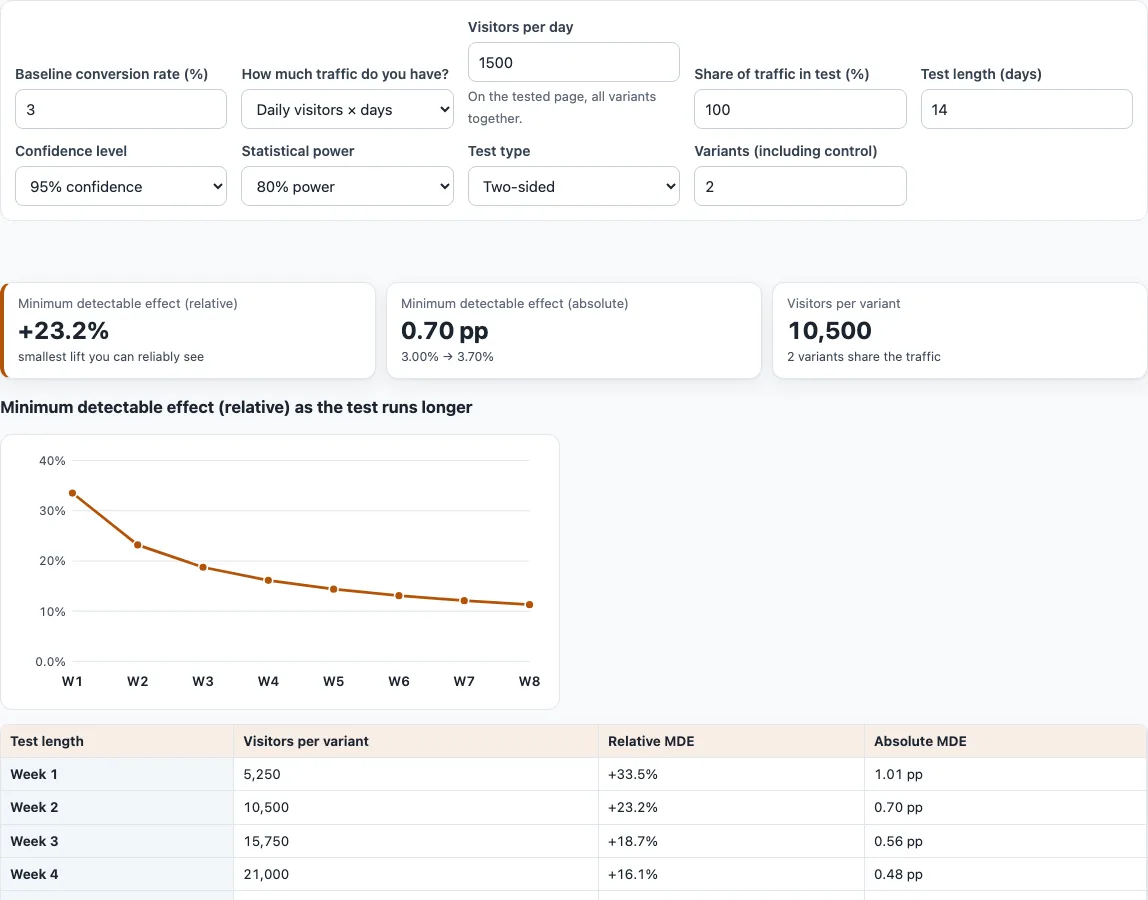
- Read the cards “Minimum detectable effect (relative)”, “Minimum detectable effect (absolute)” and “Visitors per variant”.
- Check the curve and table. With daily visitors they cover weeks 1 to 8. With visitors per variant they cover 0.25, 0.5, 1, 2, 4 and 8 times the number you entered.
- Use Copy or Download under “Result (copy or download)” to keep the text.
If the numbers cannot give a result, a message above the cards says so instead. Your settings are kept in the page address, so the link reopens the same set-up and you can share a scenario with a colleague.
What is minimum detectable effect (MDE)?
The minimum detectable effect is the smallest improvement in conversion rate that your test has a set chance of detecting. It depends on your baseline rate, the number of visitors in each variant, the confidence level and the power. Small samples can reliably detect only large lifts, while larger samples can detect smaller ones. With the defaults (3 % baseline, 14 days at 1,500 visitors a day, 2 variants, 95 % two-sided, 80 % power) there are 10,500 visitors per variant and the MDE is +23.2 % relative, or 0.70 percentage points, taking 3.00 % to 3.70 %.
How do I calculate MDE?
The tool finds the smallest increase d for which a two-proportion z-test of the baseline p against p + d, with n visitors per variant, has power equal to the power you chose. It solves this by bisection, which narrows a range until the answer is found. The variance uses the pooled proportion under the null hypothesis and the unpooled variance under the alternative, as in the statsmodels function power_proportions_2indep. Visitors per variant equal daily visitors x share x days / variants, rounded down. This is the A/B test sample size calculation turned around: it solves for the effect instead of the sample size.
Is a lower MDE better?
A lower MDE lets you detect smaller lifts, but it costs visitors. The effect shrinks roughly with 1/sqrt(n), so it falls quickly at first and then slowly. At a 3 % baseline, 95 % confidence and 80 % power, 1,500 visitors a day gives these relative MDEs: +33.51 % after week 1 (5,250 per variant), +23.18 % after week 2, +16.14 % after week 4 and +11.29 % after week 8 (42,000 per variant). Ask whether the smallest lift worth acting on can be reached in a test length you can accept.
What if my MDE is bigger than any realistic lift?
If the MDE is larger than the change you realistically expect, the test will probably miss that change even if it is real. You can run the test longer, send more of your traffic into it, test a bigger change, use a page with more traffic, or reduce the number of variants. Lowering the confidence or power makes the MDE smaller, but it raises the risk of a false positive or of missing a real effect. If even a rate of 100 % would not reach the power, the tool says no lift is detectable with that traffic.
Relative or absolute MDE?
The relative MDE is the lift as a percentage of your baseline. The absolute MDE is the lift in percentage points. A rate going from 3.00 % to 3.70 % is 0.70 points, which is +23.2 % relative. Both describe the same change, so report whichever matches how your team measures results.
How do confidence, power and variants change the MDE?
At 10,500 visitors per variant and a 3 % baseline, the relative MDE is +23.2 % at the defaults. Raising power to 90 % moves it to +27.0 %. A one-sided test lowers it to +20.5 %. Adding a third variant with Bonferroni on, at the same 10,500 per variant, raises it to +25.6 %, because each comparison with the control is tested at half the significance level.
Frequently asked questions
Why does the tool say no lift is detectable?
This happens when even a 100 % conversion rate would not reach your chosen power with the traffic you entered. More visitors, a longer test or a higher share of traffic in the test are the ways to change that.
Why are only upward lifts calculated?
The tool computes the smallest upward lift. The opposite tail of a two-sided test is ignored, as in R’s power.prop.test, which shifts results by less than 2e-8.
Does the Bonferroni checkbox change my results?
Yes. With more than 2 variants, Bonferroni tests each comparison with the control at alpha / m, where m is the number of comparisons, to control the family-wise error rate. It is conservative, so each comparison needs a larger lift to be detected.
Is MDE the same as the sample size calculator?
The calculation is the same, turned around. The sample size calculator finds the visitors needed for a chosen effect, and this tool finds the effect for the visitors you have.
Does “Visitors per day” mean visitors per variant?
No. It is the visitors on the tested page, all variants together. The tool divides the traffic in the test by the number of variants and rounds down to get visitors per variant.
What baseline should I enter?
Use the conversion rate of the page you will test over a recent, normal period, as a percentage between 0 and 100. The conversion rate calculator on this site works it out from conversions and visitors.
Can I save or share my settings?
Yes. Copy or download the result text, or share the page address, which holds all of your settings.
Related tools
- Conversion rate calculator: use it to work out the baseline conversion rate from your visitor and conversion counts.
- A/B test significance calculator: use it to check whether a result you already have is statistically significant.
- A/B test sample size calculator: use it to find how many visitors each variant needs for a specific lift.
- utm_content variant tagger: use it to tag each variant’s links so you can tell them apart in analytics.
- UTM builder: use it to build tagged campaign links for the pages in your test.