URL Builder (Query Parameters)
Add any query parameters to a URL as name/value rows, choose how spaces are encoded and copy the finished URL, or paste an existing URL and split it into rows to edit.
https://www.example.com/search?q=blue%20running%20shoes&size=42. It encodes special characters for you and shows the finished URL, ready to copy. It runs entirely in your browser: the links and values you enter are never uploaded, the page never visits them, and there is no sign-up. Use it for search links, tracking links, or any address that needs query parameters in the correct format. You can also paste an existing URL and split it into rows to edit. If you searched for a Google URL creator, note that this is an independent tool and is not made by Google.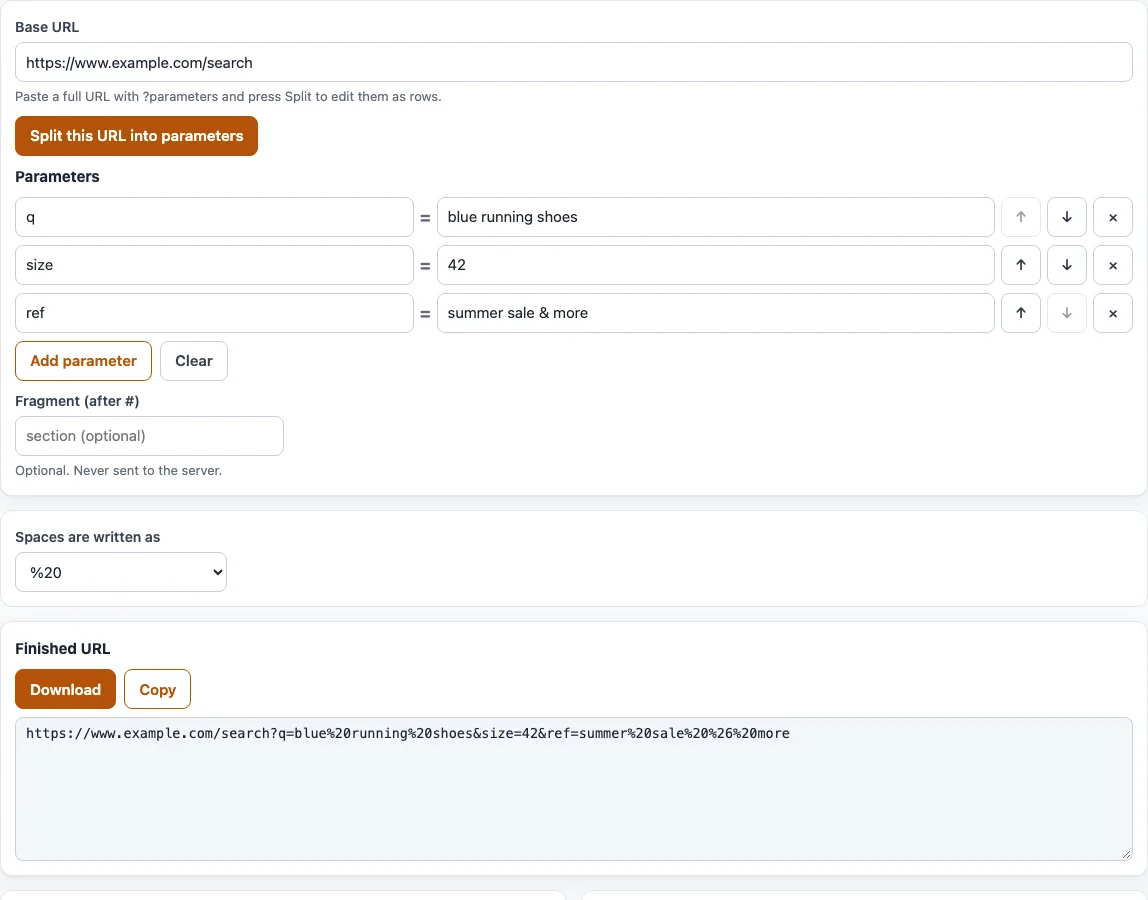
How to build a URL with query parameters
- Type the page address into “Base URL”. It should start with
http://orhttps://. A query that is already in the address is kept in front of your rows. - Fill in the rows under “Parameters”. Each row has a name, an
=sign and a value. The sample rows areqwithblue running shoes,sizewith42, andrefwithsummer sale & more. - Click “Add parameter” for another row. The arrow buttons move a row up or down, and the
×button removes it. - If the link should end with a fragment, type it into “Fragment (after #)”.
- Under “Spaces are written as”, pick
%20(the default) or+. - Read any warnings. They flag an empty base, a missing
https://, an address that is not http or https, a space in the base, a name used more than once, and a value that has no name. - Check “Finished URL” and copy it with “Copy”, or save it with “Download”. Below it, “Encoded query (what is sent)” and “Decoded (what it means)” show both versions, with a line listing the escaped characters.
To edit a link you already have, paste it into “Base URL” and click “Split this URL into parameters”. The parameters load into rows and the fragment moves into its own field. “Clear” empties everything.
What is a URL parameter or query string?
A URL parameter is a name and value pair added to the end of a web address, such as size=42. The query string is the whole set of parameters after the question mark.
The structure is fixed. A ? comes before the first parameter, & separates the pairs, and = sits between a name and its value. Google’s Analytics help says UTM parameters can appear in any order, but other servers and tools may treat order or repeated names differently. An empty value is written as name=, and a row with no name is left out.
Characters other than letters, digits, -, _, . and ~ are percent-encoded as UTF-8 bytes. For example, é becomes %C3%A9, & becomes %26, = becomes %3D, / becomes %2F, ? becomes %3F, # becomes %23 and % becomes %25. This is why the sample value summer sale & more is written as summer%20sale%20%26%20more. The encoded & no longer splits the value into a separate parameter. The “Decoded (what it means)” view shows the readable pairs.
The part after # is the fragment. It stays in the browser and is not sent to the server.
%20 or +?
Both mean a space inside a query string, so blue running shoes can be written as blue%20running%20shoes or blue+running+shoes. The %20 form works everywhere. The + form comes from the form-urlencoded format that HTML forms use.
A + is a space only inside a query string. In a path, such as /shoes/blue+running, it is a literal plus sign, so a space there must be %20. With the + option, the sample row becomes ref=summer+sale+%26+more. If you are not sure which one the receiving system expects, keep %20.
What does “Split this URL into parameters” do?
It reads an existing address back into rows. The percent-escapes are decoded and a + in the query is read as a space. For example, https://a.com/x?q=a%20b&q=c&z=1#top becomes the rows q = a b, q = c and z = 1, with top in the fragment field. The tool also warns that q is used 2 times. Edit the rows, then copy the rebuilt link.
Frequently asked questions
How do I add parameters to a URL?
Put a ? after the page address, then write each pair as name=value with & between pairs, such as ?q=blue%20running%20shoes&size=42. In the URL builder, type each pair into a row and the link is built for you.
How do I build a tracking URL?
Enter the landing page in “Base URL”, then add each tracking parameter as a row, such as utm_source with its value. Copy the link from “Finished URL”. The tool does not check whether your analytics tool reads the names you use, so confirm them against that tool’s help. For Google Analytics campaign links with the utm_ names, the UTM builder checks the values and previews the GA4 channel.
What happens with duplicate parameters?
The tool warns when a name is used more than once. Many servers and analytics tools read only the first or the last value, and the behaviour differs from server to server, so there is no single rule. Keep one value per name unless you know that the receiving system accepts repeats.
What happens to an empty row?
A row with an empty value is written as name=. A row with an empty name is left out of the finished link. If that row has a value, the tool shows a warning, so you can add the missing name.
Is this a Google URL creator?
No. The URL builder is an independent tool and is not affiliated with Google. It builds standard URLs from the rows you enter and does not connect to any Google service.
Are my links sent anywhere?
No. Everything runs in your browser. The links and values you enter are never uploaded, and the page never visits them. The tool is free and needs no sign-up.
Related tools
- UTM builder: add
utm_source,utm_mediumandutm_campaignand preview the GA4 channel. - Campaign URL builder (GA4): a form with all nine GA4 campaign parameters.
- GA4 channel checker for UTM: see which channel a UTM link is grouped into.
- UTM parameters explained: what each UTM parameter is for.
- UTM examples: sample links to copy the format from.
- UTM link checker: check an existing UTM link for mistakes.
- Email UTM builder: tag the links in an email campaign.