UTM Campaign: Build a Consistent utm_campaign Name
Combine date, product, audience, region, offer and channel into one clean utm_campaign value, check it against GA4's channel rules and add it to a link.
utm_campaign parameter of a link, and this builder helps you write that name the same way every time. Enter a date, product, audience, region, offer and an optional channel, and the tool joins them into one clean value in the order and with the separator you choose. It also checks the name against GA4’s channel rules and can add it to a tagged link. Everything runs in your browser, is free and needs no sign-up. Values in analytics reports are case sensitive, so one fixed format makes campaigns much easier to compare later.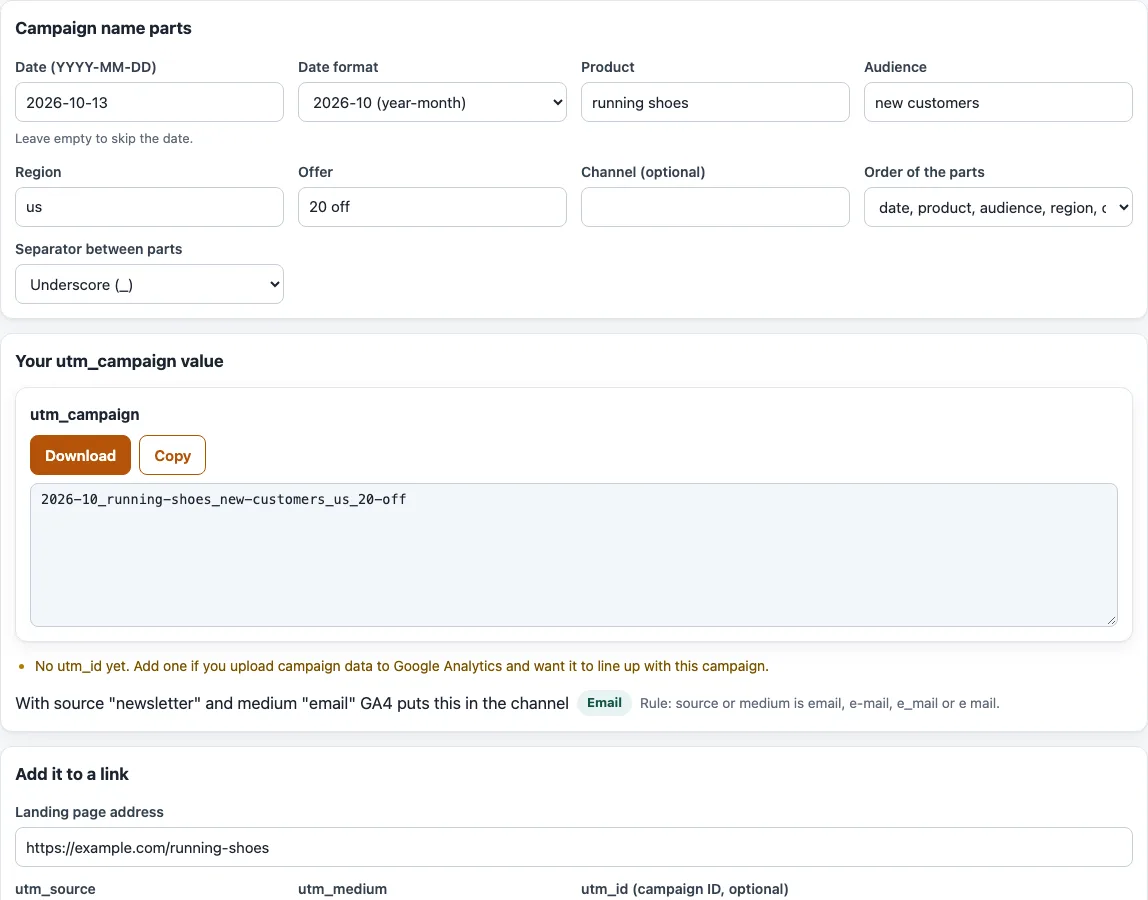
How to build a utm_campaign name
- Check “Date (YYYY-MM-DD)”. It starts as today’s date; change it if the campaign starts on another day, or leave it empty to skip the date.
- Choose a “Date format”: “2026-10 (year-month)”, “202610”, “20261013 (year-month-day)” or “No date”.
- Fill in “Product”, “Audience”, “Region” and “Offer”. The examples are running shoes, new customers, us and 20 off. “Channel (optional)” starts empty and can stay that way.
- Pick an “Order of the parts” from the four presets, and a “Separator between parts”: Underscore (_), Dash (-) or Dot (.).
- Read “Your utm_campaign value” and the checks under it. They warn about capital letters, spaces, special characters, names over 100 characters, names shorter than 4 characters, the GA4 shopping rule, “cross-network” and a missing
utm_id. - The line “With source … and medium … GA4 puts this in the channel” shows the GA4 channel. Source starts as
newsletterand medium asemail; change both in “Add it to a link”. - Under “Add it to a link”, enter the “Landing page address”,
utm_source,utm_mediumand, if you have one, “utm_id (campaign ID, optional)”. The “Tagged link” box then holds the finished link. - Select “Copy” or “Download” on the name or on the link.
Your changes are kept in the page address, so reopening that address brings back the same setup.
What is a UTM campaign?
“UTM campaign” is the utm_campaign parameter, a tag at the end of a web address that tells analytics which campaign, promotion or product a link belongs to. Google’s own example value is spring_sale. GA4 reports it as “Session manual campaign name”. Along with utm_source and utm_medium it is one of the three parameters you should always set, and values are case sensitive.
UTM campaign examples
spring_sale is a simple name. The builder can also make a longer one: with the date 2026-10-13 in the 2026-10 format, “running shoes”, “new customers”, “us”, “20 off”, the default order and an underscore, it produces 2026-10_running-shoes_new-customers_us_20-off. Every part is lower-cased, and the spaces became dashes because the separator is an underscore. The same link with source newsletter and medium email lands in the Email channel.
What is utm_id and how is it different?
utm_id is a separate parameter that holds a campaign ID, while utm_campaign holds the name. Google says to use the same IDs you use when uploading campaign data. GA4 reports it as “Session manual campaign ID”. In the builder the field is optional, and the checks remind you if it is empty.
Why did my traffic land in Shopping?
GA4’s default channel group has a shopping rule that looks at the campaign name. Paid Shopping applies when the source is a listed shopping site or the campaign name matches the shopping pattern, and the medium is paid: it contains cp, equals ppc or retargeting, or starts with paid. Organic Shopping applies when the source or the same campaign-name pattern matches and the medium is not paid.
The pattern matches “shop” at the start of the name or after anything except the letters a to d and f to z, so after a digit, _, - or the letter e. spring_shop, shop-sale and spring-shopping match; workshop does not, because “k” comes before “shop”. The word “shopping” matches wherever it appears, so workshopping matches. For example, source google, medium cpc and campaign spring_shop gives Paid Shopping. If that is not what you want, rename the campaign.
Cross-network campaigns
A campaign name that contains cross-network is put in the Cross-network channel. Google’s help page lists Demand Gen, Performance Max and Smart Shopping there. It gives no full priority order, but it lists Cross-network and Paid Shopping before Paid Search, and the tool checks them in that order.
Which characters can I use, and how long can it be?
Letters, digits, - and _ keep reports tidy. The builder lower-cases each part, removes accents, turns spaces into a dash (or an underscore when the separator is a dash or dot) and drops other symbols. It warns above 100 characters; that limit is this tool’s check, not a Google rule.
Frequently asked questions
Does this tool upload my links or data?
No. It runs in your browser, so nothing you type is uploaded, and the page never visits the links you build.
Why does the tool warn about capital letters?
Values are case sensitive, so Spring_Sale and spring_sale can show up as two campaigns in reports. The checks flag capitals so you can fix the name first.
What happens if I leave a part empty?
Empty parts are skipped and leave no gap in the name. The “Channel (optional)” part starts empty.
Which separator should I use?
Underscore is the default, and Dash (-) or Dot (.) are the other choices. Pick one and keep it for every campaign. With an underscore, spaces inside a part become dashes, so running shoes becomes running-shoes.
Why is a name flagged as very short or very long?
Names shorter than 4 characters say little in reports, and names over 100 characters are hard to read. Use short parts such as a promo code instead of a full sentence.
Can I add my own parts?
The six parts are fixed: date, product, audience, region, offer and channel. Leave a part empty to skip it, and put the information you need into the part that fits best, for example a promo code in “Offer”.
Where are my settings kept?
In the page address. Reopening or sharing that address brings back the same setup.
Related tools
- UTM parameters: what each UTM parameter does before you start tagging links.
- UTM source: choose a clean
utm_sourcevalue. - UTM medium: check which GA4 channel your
utm_mediumlands in. - UTM content: tag every variant of a link.
- UTM term: turn paid keywords into
utm_termvalues. - UTM builder: build a complete tagged link from the start.
- Google UTM and GA4 channels: see which GA4 channel your UTMs land in.