Google UTM: Which GA4 Channel Will Your Links Land In?
Paste tagged URLs or source / medium / campaign rows and see which Google Analytics 4 default channel each lands in, which rule matched, and why a row is Unassigned.
This Google UTM checker shows which Google Analytics 4 (GA4) channel your UTM-tagged links land in. Paste tagged URLs or source, medium and campaign rows, and it shows the channel and the rule that matched each row, so you can see how GA4’s default channel group will sort your traffic before a campaign goes live.
It runs in your browser. The links and lists you enter are never uploaded, the page never visits your links, and there is no sign-up. This site is not affiliated with Google.
The tool models only manual traffic, meaning UTM-tagged links and source and medium pairs. Google Ads auto-tagging, DV360, CM360, SA360 and Merchant Center channel rules depend on data that a URL does not contain, so they are not modelled.
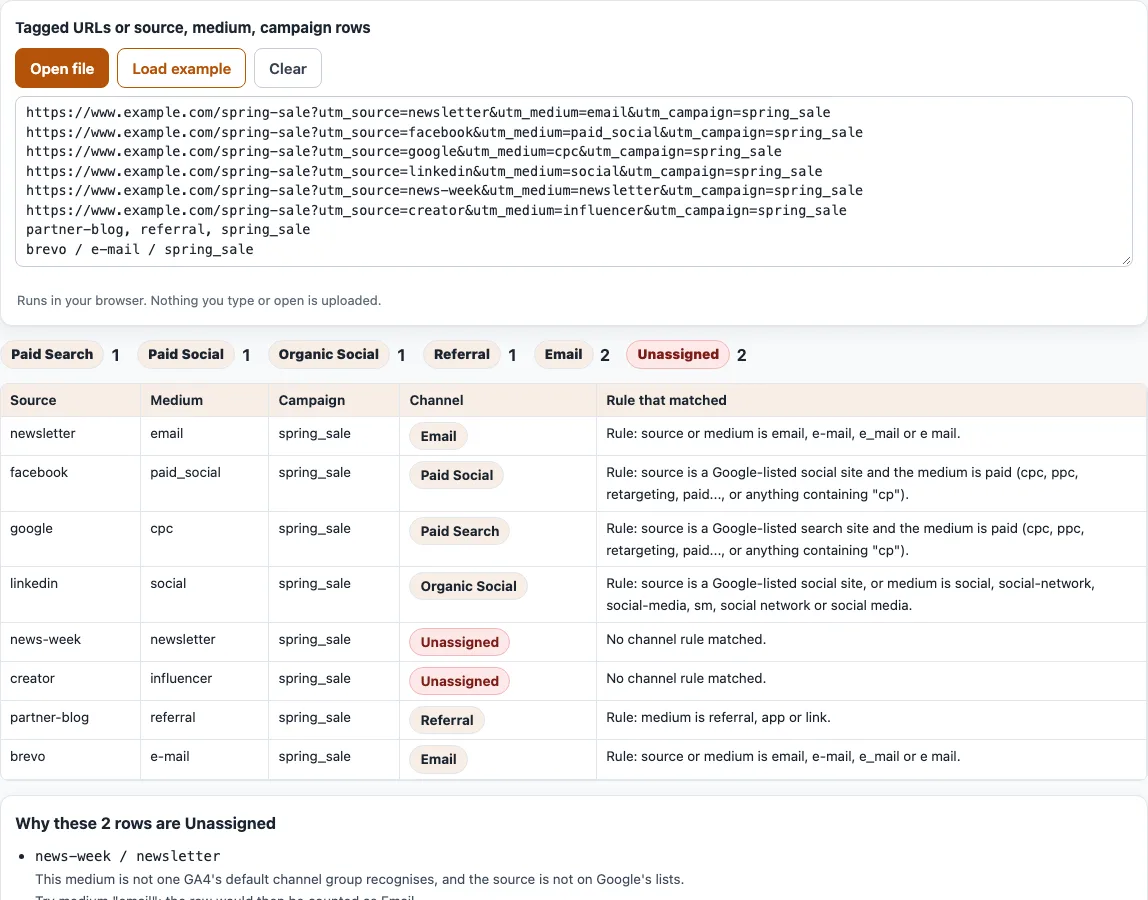
How to check which GA4 channel a UTM link lands in
- Paste your rows into the box labelled “Tagged URLs or source, medium, campaign rows”. Each line can be a tagged URL with
utm_parameters, or columns for source, medium and optionally campaign. - Separate columns with a comma, a tab,
|or/, sonewsletter / emailworks. A header line such assource, mediumis skipped. - Or click “Open file” to load rows from a file, or “Load example” to fill the box with eight sample lines.
- Read the count chips above the table. They show how many rows fall into each channel.
- Check the table with the columns Source, Medium, Campaign, Channel and “Rule that matched”. It shows the first 500 rows.
- For each Unassigned row, read the box titled “Why this row is Unassigned” or “Why these rows are Unassigned”. When a different medium would move the row to another channel, it suggests one, for example
Try medium "email". - Copy or download all rows from the box “Result as CSV”. It has the columns source, medium, campaign, channel and rule.
- Click “Clear” to empty the input and start again.
A URL line without any utm_ parameter is shown as “(no utm in URL)”. Parameter names are read case-insensitively.
How does Google Analytics read UTM parameters?
GA4 reads the UTM values in a tagged link as the session’s source, medium and campaign, and its default channel group sorts sessions into channels from those values. Most rules look at the medium or the source. Two also read the campaign name: Cross-network, when it contains cross-network, and the shopping rules.
Google’s help page does not state an order of precedence for the rules. This tool checks them in the order the page lists them: Direct, Cross-network, Paid Shopping, Paid Search, Paid Social, Paid Video, Display, Paid Other, Organic Shopping, Organic Social, Organic Video, Organic Search, AI Assistant, Referral, Email, Affiliates, Audio, SMS and Mobile Push Notifications. That order is our reading, so treat a result as a strong hint and confirm it in your own reports.
Values are lower-cased before matching. The search, social, shopping and video source lists come from the spreadsheet Google links on that page. The tool holds 129 search, 592 social, 52 shopping and 46 video entries and matches the whole source value. Google reviews additions at least once a year, so a newer source can be missing.
Order shows in the results. A source of facebook with the medium email is Organic Social, because the social-source rule comes before the Email rule in that list. A source of facebook with the medium paid_social is Paid Social, but paid_social with a source that is not on the social list is Paid Other.
Why is my traffic Unassigned?
Unassigned is the value Analytics uses when no other channel rule matches the event data. In the example, news-week with the medium newsletter and creator with the medium influencer are both Unassigned, because no rule knows those mediums. The box under the table explains each case. A row with no medium gets the message “No medium”, and a row with an unknown medium gets “not a medium GA4’s default channel group recognises”.
To fix a row, change the medium to a value a rule recognises. For email, email, e-mail, e_mail and e mail all match, so newsletter becomes email. Anything that starts with paid or contains cp counts as a paid medium. The plural affiliates is Unassigned, because only affiliate maps to Affiliates. Run the rows again to confirm.
Frequently asked questions
What is UTM in Google Analytics?
UTM parameters are tags at the end of a URL, such as utm_source, utm_medium and utm_campaign. Google Analytics reads them when someone arrives through a tagged link and groups that visit into a channel. This tool shows the channel each tagged link will land in.
Where do I see UTM data in GA4?
Open the Acquisition > Traffic acquisition report. Google says you can view Session source / medium, Session medium, Session source and Session campaign there. Missing parameters appear as (not set).
Which medium values should I use?
Use mediums that the channel rules recognise, such as email, cpc, social, referral, affiliate, display, organic, audio, sms, push and video. For paid social, use a paid medium such as paid-social together with a source on the social list, such as facebook. The default channel group cannot be edited in GA4, so the values in your links are the part you control.
Are UTM values case sensitive?
In reports, yes. Google says parameter values are case sensitive, so Email and email show as two values. The tool lower-cases values before matching, so it can show one channel for rows your reports would list separately. Pick one lowercase style for every link.
Does this tool send my links anywhere?
No. Everything runs in your browser. The links and lists you enter are never uploaded, and the page never visits the links.
Is this tool made by Google?
No. This site is not affiliated with Google. The channel rules come from the Google Analytics help page “Default channel group”, and the tool applies them to your rows.
Related tools
- UTM builder: build a tagged link, then check its channel here.
- Campaign URL builder (GA4): build a link with all nine GA4 parameters.
- URL builder: add any query parameters to a URL.
- UTM parameters explained: what each UTM parameter means.
- UTM medium: look up a single medium and see its channel.
- UTM examples: finished links for common channels.
- UTM link checker: check a link that already has UTM tags.