UTM Link Checker: Decode and Clean a UTM Link
Paste a tagged link to see every parameter decoded, the problems in it and the GA4 channel it would get, then copy it without UTM or without UTM and click IDs.
utm_source=newsletter and utm_campaign=spring_sale. This UTM link checker takes one tagged link apart: it decodes every parameter, lists what each one means, flags common mistakes and shows which GA4 channel the UTM values would land in. It also gives you the same link without UTM parameters, or without UTM parameters and click IDs. It runs in your browser, is free and needs no sign-up. The link you paste is never opened, uploaded or visited, so you can check links that are not live yet.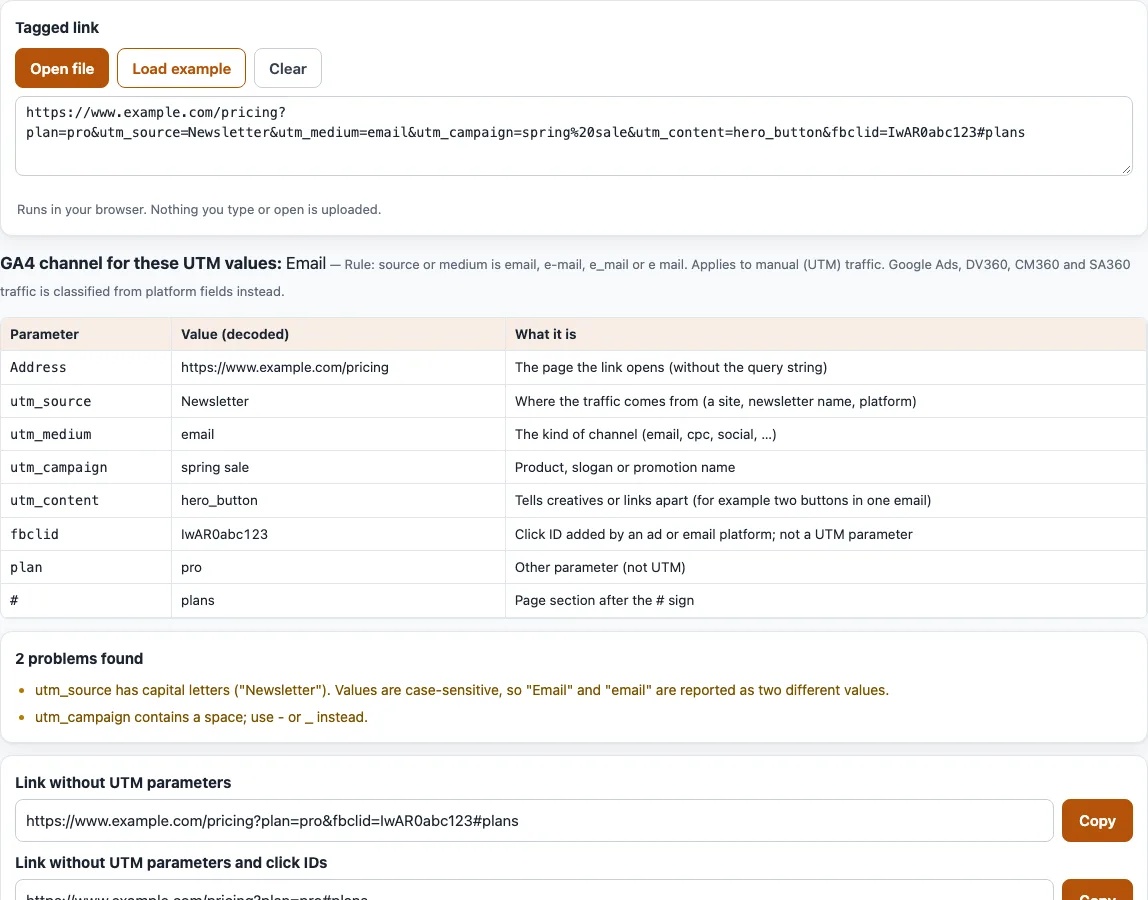
How to check a UTM link
- Paste your tagged link into the “Tagged link” box. To try the tool first, select “Load example”. To read a link from a file, select “Open file”. “Clear” empties the box.
- Only the first non-empty line is checked. Extra lines are reported as ignored, with a pointer to the UTM audit (
/utm-tracking/) for whole lists. - Read the line “GA4 channel for these UTM values:” and the rule behind it. If the link has none of
utm_source,utm_mediumorutm_campaign, the tool says the link has no UTM parameters instead. - Go through the table with the columns “Parameter”, “Value (decoded)” and “What it is”. It lists the address without its query string, each
utm_parameter, UTM written after the#, click IDs, other parameters and the#part. - Read the problems list. It reports a missing
https://, missing or empty source, medium or campaign, capital letters, spaces,+signs, special characters, repeated parameters, UTM after the#, unknownutm_names, an e-mail address in a value, values over 100 characters, and a source equal to the medium. - Copy “Link without UTM parameters” or “Link without UTM parameters and click IDs”. Other parameters and the
#part stay exactly as typed.
With the pre-filled example, the table shows utm_source as Newsletter, utm_medium as email, utm_campaign as “spring sale”, and fbclid as a click ID. The channel is Email, and two problems appear: capital letters in utm_source and a space in utm_campaign. The link without UTM parameters is https://www.example.com/pricing?plan=pro&fbclid=IwAR0abc123#plans.
What is a UTM link? What are UTM links?
A UTM link, also called a UTM URL, is a web address that carries utm_ parameters after a ?. Each parameter is a name and a value joined by =, parameters are joined by &, and they can come in any order, for example https://example.com/?utm_source=newsletter&utm_medium=email&utm_campaign=spring_sale. Analytics tools read them to say which campaign sent a visit. UTM links are part of the address, so visitors can see them in the address bar; never put personal data such as an e-mail address in one.
UTM link meaning: what each parameter means
The tool explains these parameters, which Google Analytics 4 reads:
utm_source: where the traffic comes from, such asgoogle,newsletter4orbillboard.utm_medium: the kind of channel, such ascpc,banneroremail.utm_campaign: a product, slogan or promo code.utm_id: a campaign ID.utm_term: a paid keyword.utm_content: tells creatives or links apart, such as two call-to-action links in one email.utm_source_platform: the platform that sends the traffic, such as Search Ads 360.utm_creative_formatandutm_marketing_tactic: not currently reported in GA properties.
The meaning of the UTM links you build also depends on how reports read them. Values are case sensitive, so utm_source=google and utm_source=Google are different sources, and SpringSale and Spring_Sale are different campaigns. Always set utm_source, utm_medium and utm_campaign, and use one lowercase style. Missing parameters show as “(not set)”.
Where does the GA4 channel come from?
The channel line follows Google’s default channel group rules for manual traffic. Email applies when the source or medium is email, e-mail, e_mail or e mail. Paid Search and Paid Social need a listed source and a medium that matches ^(.*cp.*|ppc|retargeting|paid.*)$. Display covers banner, display, expandable, interstitial and cpm. Affiliates, Audio and SMS use affiliate, audio and sms, and Referral uses referral, app or link. Matching is not case sensitive.
Google Ads, DV360, CM360 and SA360 traffic is classified from platform fields, so the channel shown here is for manually tagged traffic only.
What happens to UTM after the # sign?
Anything after # is not sent to the server, so the tool shows it as “not sent to the server and not read as campaign data” and lists it as a problem. Put the UTM parameters before the #.
Frequently asked questions
Is a UTM tracking link visible to visitors?
Yes. The parameters are part of the address, so anyone who sees the link can read them. The table shows exactly what a link carries before you share it.
How do I remove UTM from a link?
Paste the link and copy “Link without UTM parameters”. All utm_ parameters go; other parameters and the # part stay. To remove click IDs such as fbclid too, copy “Link without UTM parameters and click IDs”.
Which click IDs are removed?
gclid, gbraid, wbraid, dclid, fbclid, msclkid, ttclid, twclid, li_fat_id, mc_cid, mc_eid, _hsenc, _hsmi, igshid and yclid.
Why does the tool say the link has no UTM parameters?
It contains none of utm_source, utm_medium or utm_campaign, so there is nothing to match to a GA4 channel and a visit from it would not carry campaign data.
Why is my value flagged for capital letters?
Values are case sensitive, so Newsletter and newsletter are read as two sources. Use lowercase and the same spelling in every link.
Why are UTM_Source or utm-source flagged?
They are not written exactly as utm_ parameters, which are lower-case with an underscore, like utm_source.
Does the tool open my link?
No. It never fetches or opens the link and makes no network requests; everything is read from the text you paste.
Related tools
- UTM tracking audit: check a whole list of UTM links against a naming convention.
- UTM examples: sample tagged links for common channels.
- Email UTM builder: add UTM parameters to every link in an email.
- UTM builder: build a tagged link from scratch.
- UTM parameters: the full meaning of each parameter.
- Google UTM and GA4 channels: see which GA4 channel your manual UTM values fall into.