UTM Medium: Check Which GA4 Channel It Lands In
Type a utm_medium, and optionally a source, to see which GA4 default channel it maps to, why, and whether it would end up in Unassigned.
utm_medium, that names the kind of traffic, such as cpc, banner or email. This free checker shows which Google Analytics 4 (GA4) channel a medium lands in. Enter a medium, add a source if you like, and the tool returns the channel, the rule that matched and warnings for common mistakes. It runs in your browser and needs no sign-up, and the values you enter are never uploaded. Use it before you publish a campaign link, to confirm that the traffic will appear in the channel you expect, such as Paid Search or Email, and not in Unassigned. This site is not affiliated with Google.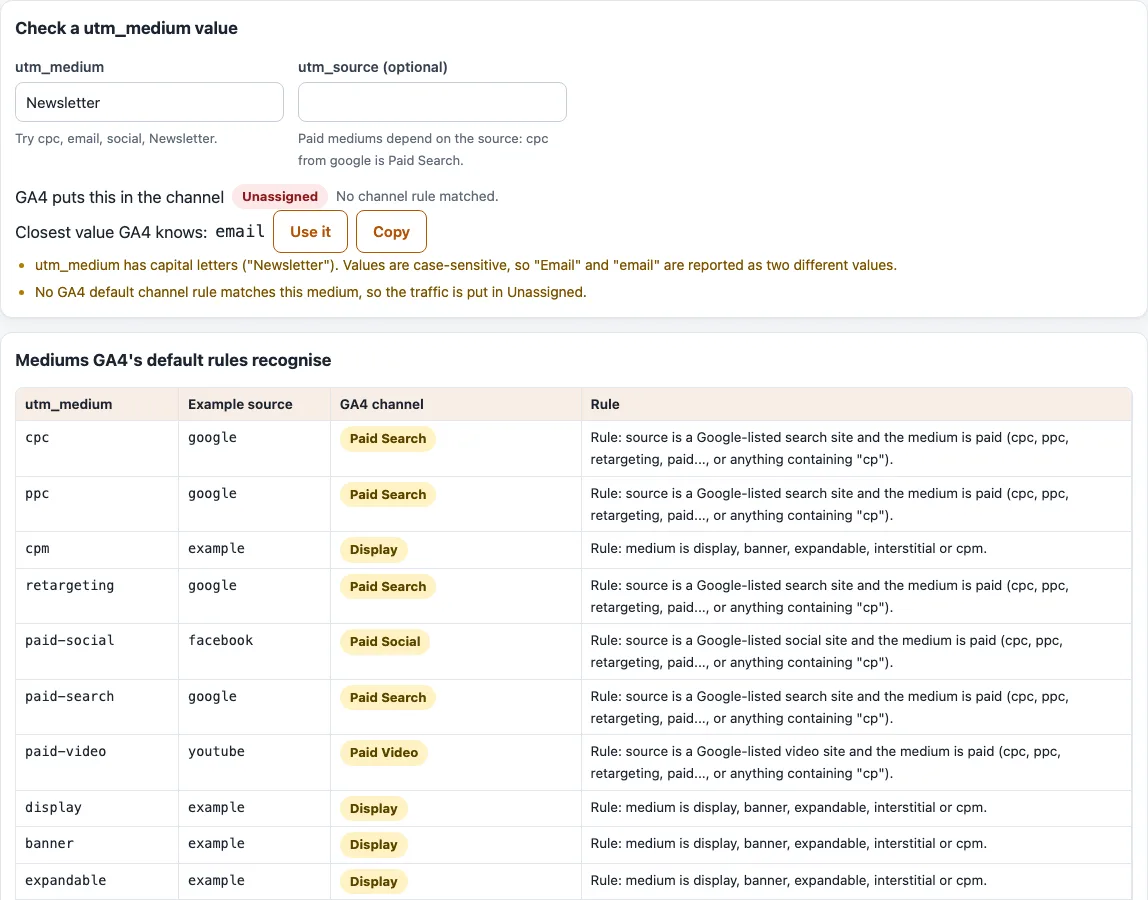
How to use the utm_medium checker
- In the field “utm_medium”, replace the sample “Newsletter” with the medium from your link, such as
cpcoremail. - Optionally, type your source into “utm_source (optional)”, such as
google. Without a source, the tool assumes one that is on no GA4 list,example. - Read the line “GA4 puts this in the channel”, which shows the channel and, in small text, the matching rule in words.
- Read the problem list. It flags capital letters and spaces. When no GA4 default channel rule matches, it says so and tells you the traffic is put in Unassigned. If everything is fine it shows “No problems found.”
- When a “Closest value GA4 knows:” suggestion appears, click “Use it” to put it into the field, or “Copy” to copy it. The suggestions are this site’s own, and each one is checked to land in a channel.
- Scroll down to the table “Mediums GA4’s default rules recognise” for the full list, and to “Mediums that look right but end up in Unassigned” for common mistakes.
The source can change the result, so test one change at a time. A paid medium such as cpc is Paid Search with the source google and Paid Other with my-partner. The settings are kept in the page address.
What is utm_medium?
utm_medium describes how a visit arrived. Google’s examples are cpc, banner and email, and GA4 reports it as Session medium. GA4 reads it together with utm_source and compares both against the rules of its default channel group. Some rules check only the medium, and others also check the source. If nothing matches, the visit goes to Unassigned. Because of this, a small difference in spelling can move your traffic to another channel.
Google states no order of precedence for the rules. The tool checks them in the order the help page lists them, which is our reading. For example, a source on the social list, such as facebook, is Organic Social even with the medium email.
UTM medium list and examples
The tool’s table lists 28 mediums that the default rules recognise. Some examples it produces: cpc with google gives Paid Search, cpc with my-partner gives Paid Other, cpm gives Display, paid-social with facebook gives Paid Social, app gives Referral and push gives Mobile Push Notifications. Others in the table include ppc, retargeting, paid-video, banner, affiliate, audio, sms, video and organic.
UTM medium cpc
cpc is the usual short form of cost per click and marks a paid medium. The paid pattern is ^(.*cp.*|ppc|retargeting|paid.*)$, so cpc and ppc match, and so does any value that contains cp. With a search, social, video or shopping source, the visit is Paid Search, Paid Social, Paid Video or Paid Shopping. With any other source it is Paid Other.
UTM medium social
Organic Social applies when the medium is social, social-network, social-media or sm, or when the source is on the social list. A paid social campaign should use a paid medium instead, such as paid-social or cpc, together with a social source, for example facebook. Put the platform name in utm_source, not in utm_medium.
Why is my traffic Unassigned?
Unassigned is the value Analytics uses when there are no other channel rules that match the event data. The usual cause is a medium that no rule recognises. The tool lists values that look right but end up there, including newsletter, facebook, twitter, linkedin, adwords, google-ads, banners, ads, partner, podcast, seo and text. For each one it suggests a value that lands in a channel. With the source weekly, the medium newsletter is Unassigned and the suggestion is email.
Frequently asked questions
Does the tool send my links anywhere?
No. The values you enter are never uploaded, and the page never visits any link.
Why do Email and email show as two mediums?
GA4’s channel definitions are not case sensitive, so both spellings land in the same channel. Reports keep the exact spelling, though, and Google says parameter values are case sensitive, so they show as two mediums. Use one spelling across all your links.
Which medium should I use for email?
Use email. The Email rule also accepts e-mail, e_mail and e mail, either as the medium or as the source. A medium such as newsletter or mail is not recognised, so a visit with it is Unassigned unless the source is on a GA4 list.
Is this tool made by Google?
No. This site is not affiliated with Google. It checks your values against the rules in Google’s “Default channel group” help page, as we read them.
Does the order of the rules change the result?
It can. The page does not state a precedence, so the tool follows the order in which the rules are listed. If a value could match more than one channel, test it with the source you really use, and then check a real session in your GA4 reports.
Related tools
- UTM parameters explained: what each UTM parameter means.
- UTM source: pick a clean
utm_sourcevalue to pair with your medium. - UTM campaign: build a consistent
utm_campaignname. - UTM content: tag every variant of a link.
- UTM term: turn paid keywords into
utm_termvalues. - UTM builder: build the complete tagged link once your values are checked.
- GA4 channel checker for UTM: check a list of source and medium pairs at once.