UTM Parameters: What Each One Does, With a Live Builder
Fill in the nine GA4 UTM parameters and watch the tagged link build live, or paste a tagged link to see what each part means and where Google Analytics reports it.
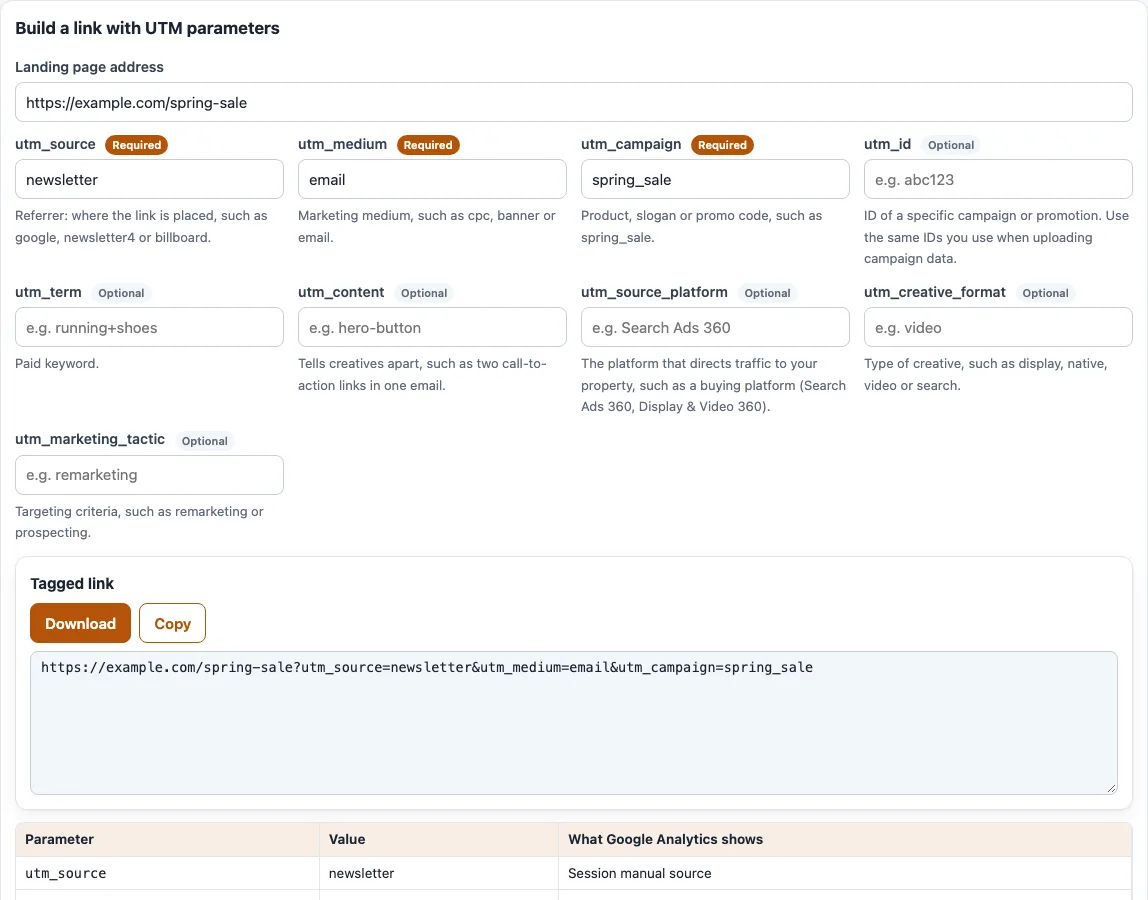
How to use the UTM parameters tool
To build a tagged link:
- Type the page you want visitors to land on into “Landing page address”.
- Fill in the parameter boxes you need. The first three start with sample values (
newsletter,emailandspring_sale), which you can change or clear. Each box has a “Required” or “Optional” badge, a one-line meaning and an example. The badges follow Google’s advice to always use the first three. Google does not call them formally required. - Watch the “Tagged link” box. It updates while you type. Empty boxes are left out and a space becomes
%20. - Read the table under it. The column “What Google Analytics shows” gives the GA4 dimension each parameter fills.
- Read the problem list. It flags capital letters, spaces, special characters and a missing source, medium or campaign.
- Click “Copy” or “Download” to take the link.
To explain a link you already have:
- Under “Explain a tagged link”, paste a link into “Paste a link with UTM parameters”, or click “Open file” or “Load example”.
- Review the table with the columns Parameter, Value, “Required?” and “What Google Analytics shows”. If source and medium are present, you also see the GA4 channel, its rule and “Session source / medium”.
- Check the warnings, such as a missing source, medium or campaign, a repeated parameter or a UTM tag after
#.
The builder’s settings are kept in the page address, so copying that address brings you back to the same values.
What are UTM parameters?
UTM parameters are name and value pairs that you add to a link after a question mark, such as utm_source=newsletter. Analytics tools read them to group visits by source, medium and campaign. Google’s Analytics help says that when you add parameters to a URL, you should always use utm_source, utm_medium and utm_campaign. It also recommends utm_id and utm_source_platform. GA4 reads nine of them:
utm_source: the referrer, such as google, newsletter4 or billboard.utm_medium: the marketing medium, such as cpc, banner or email.utm_campaign: a product, slogan or promo code, such as spring_sale.utm_id: the ID of a campaign or promotion. Use the same IDs you use when uploading campaign data.utm_source_platform: the platform that directs traffic, such as a buying platform like Search Ads 360 or Display & Video 360.utm_term: a paid keyword.utm_content: tells creatives apart, such as two call-to-action links in one email.utm_creative_format: the type of creative, such as display, native, video or search.utm_marketing_tactic: the targeting criteria, such as remarketing or prospecting.
What are the 5 UTM parameters?
The five classic UTM parameters are utm_source, utm_medium, utm_campaign, utm_term and utm_content. GA4 also reads utm_id, utm_source_platform, utm_creative_format and utm_marketing_tactic. Google says the last two are not currently reported in Google Analytics properties.
What do UTM parameters become in Google Analytics?
They fill the “Session manual” dimensions of GA4: Session manual source, medium, campaign name, campaign ID, term, ad content, source platform and creative format. For utm_marketing_tactic the tool uses the name “Manual marketing tactic”. Source, medium and campaign appear in the Traffic acquisition report as Session source, Session medium and Session campaign. If a parameter is missing, reports show (not set).
GA4 also uses source, medium and campaign to choose a channel from its default channel group. For example, google with cpc is Paid Search. Traffic that matches no rule is Unassigned. Google says channel definitions are not case sensitive, cannot be edited and may change.
Parameter values themselves are case sensitive. Google’s help says utm_source=google is different from utm_source=Google, so use one spelling everywhere.
Frequently asked questions
What is a UTM parameter?
A UTM parameter, sometimes shortened to UTM param, is one name and value pair in a link, such as utm_medium=email. The name starts with utm_ and says what kind of fact the value is. A link can carry several, joined with &.
UTM parameters meaning
Each parameter has its own meaning. Source says where the visit came from, medium says what kind of traffic it is, and campaign says which promotion it belongs to. The remaining parameters add detail: an ID, a keyword, a creative or a platform.
UTM tags meaning
A UTM tag is another name for a UTM parameter. The word tag comes from the idea of labelling a link. UTM tags are the labels that tell analytics where each click came from.
What are UTM codes, and what are UTMs?
People use UTM codes for the whole tagged part of a link, such as ?utm_source=newsletter&utm_medium=email&utm_campaign=spring_sale. UTMs is the short, informal word for UTM parameters, UTM tags or tagged links, as in “the newsletter link has UTMs”.
What is UTM tagging?
UTM tagging means adding these parameters to the links you share, so that each source, medium and campaign shows up separately in your reports. The builder above does the tagging for you.
What is UTM in marketing, and what is the UTM marketing meaning?
In marketing, UTM tags label links so that traffic from each email, ad or post can be reported by source, medium and campaign. They are how you tell your campaigns apart in analytics.
Which UTM parameters are required?
Google says you should always use utm_source, utm_medium and utm_campaign, and does not call any parameter formally required. The tool warns you when one of the three is missing.
Why is a UTM parameter after # not counted?
The part of a link after # is not sent to the server, so analytics does not read it as campaign data. The tool flags a UTM parameter placed after #. Put your parameters before it.
Related tools
- UTM source: pick a clean
utm_sourcevalue and see the channels it lands in. - UTM medium: check which GA4 channel a
utm_mediumvalue lands in. - UTM campaign: build a consistent
utm_campaignname. - UTM content: tag every variant of a link with its own
utm_content. - UTM term: turn paid keywords into
utm_termvalues. - UTM builder: build a complete tagged link, or tag many links at once.
- GA4 channel checker for UTM: see which channel your tagged links land in.