UTM Source: Pick the Right utm_source Value
Type where your link will be placed and get a clean, consistent utm_source value, plus the GA4 channel it lands in with different mediums.
utm_source, that names where a visit came from, such as a newsletter, a social platform or a partner site. This free helper turns a name, a platform or a pasted address into one clean, lower-case utm_source value, and it checks that value for problems. It also shows which Google Analytics 4 (GA4) channel a visit with that source would land in for different mediums, and it builds a tagged link for you to copy or download. It runs in your browser, needs no sign-up, and the links and names you enter are never uploaded. This site is not affiliated with Google.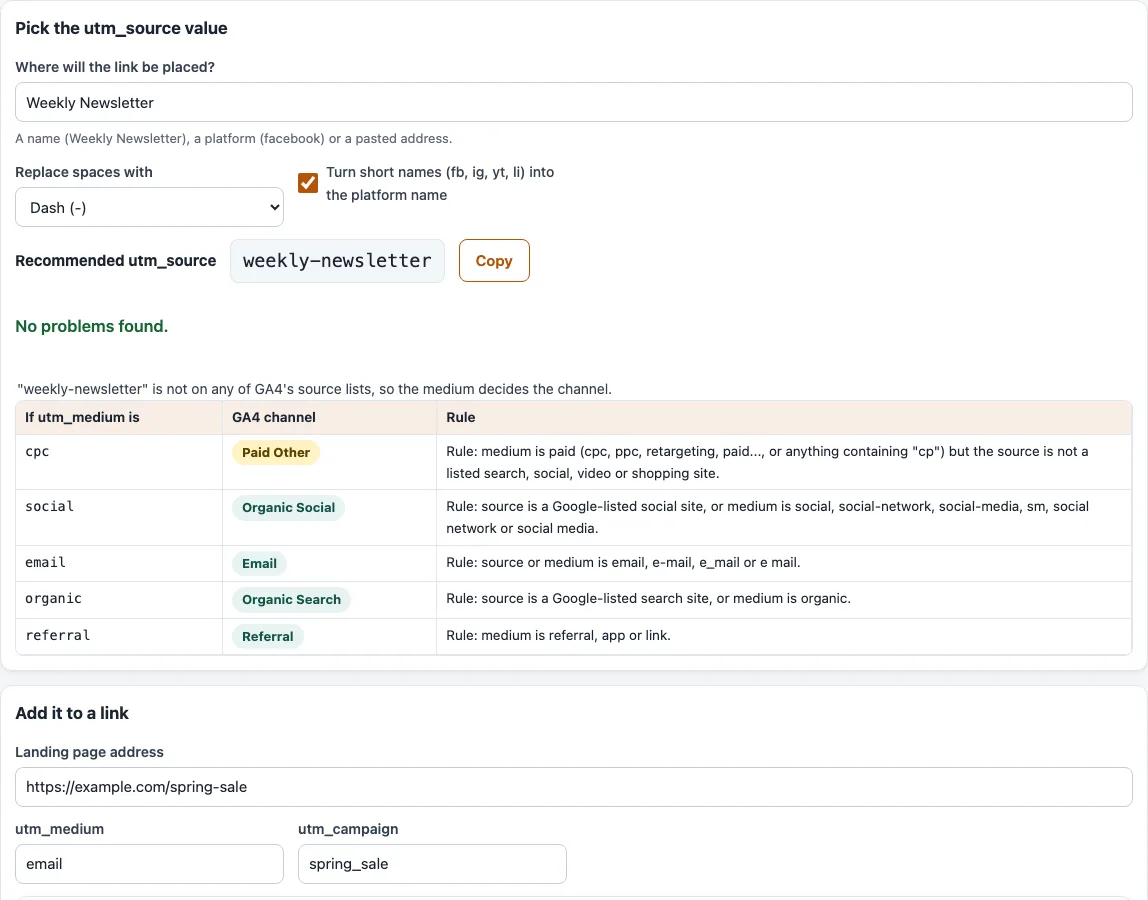
How to use the utm_source helper
- Type a name, a platform or a pasted address into “Where will the link be placed?”. The sample is “Weekly Newsletter”. A pasted address is cut down to its host, so the scheme,
www., path and query are removed. - Under “Replace spaces with”, choose “Dash (-)” (the default) or “Underscore (_)”.
- Leave “Turn short names (fb, ig, yt, li) into the platform name” ticked to turn
fbintofacebook. Untick it to keep the short name. This short-name list is this site’s own, not a Google rule. - Read “Recommended utm_source” and click “Copy” to take the value. The value is lower-case.
- Check the problem list under it. It warns about special characters and e-mail addresses in the value.
- Read which GA4 source list the value is on (search, social, shopping or video), if any. The table then shows the GA4 channel and rule for the mediums
cpc,social,email,organicandreferral, plus the medium you type under “Add it to a link”. - In “Add it to a link”, enter the “Landing page address” and check “utm_medium” (sample
email) and “utm_campaign” (samplespring_sale). The “Tagged link” box fills in. Click “Copy” or “Download”.
Under “Common utm_source values”, a table lists 18 typical values with their kind of place, GA4 source list and channel with cpc and with social. Click “Use” in a row to fill the helper. Your settings are kept in the page address, so bookmarking it keeps them.
What is UTM source?
utm_source names the referrer: the site, platform or place that sent the visitor. Google’s examples are google, newsletter4 and billboard. In GA4 the value is reported as Session source, and together with the medium as Session source / medium.
Source is one of three parameters Google says you should always use. The other two are utm_medium and utm_campaign. Source answers “where from?”, medium answers “what kind of traffic?”, and campaign answers “which promotion?”.
UTM source meaning and examples
In plain words, the UTM source is the label for the place where your link sits. For a link in your weekly email, weekly-newsletter is a clear source. For a post on LinkedIn, use linkedin. Pick a short name, keep it lower-case, and write it the same way every time. Google says parameter values are case sensitive, so Facebook and facebook show as two separate sources in reports.
Does the source change the channel?
Yes. GA4’s default channel group looks at source and medium together. Here are the main manual-traffic rules from Google’s help page:
- Paid Search, Paid Social, Paid Video and Paid Shopping need a source on the matching search, social, video or shopping list (for Paid Shopping, a campaign name that matches the shopping pattern also works). The medium must match
^(.*cp.*|ppc|retargeting|paid.*)$. - Organic Social applies when the source is on the social list or the medium is
social,social-network,social-mediaorsm. - Organic Search applies when the source is on the search list or the medium is
organic. - Email applies when the source or the medium is
email,e-mail,e_mailore mail.
The source lists are in a spreadsheet that Google links from that page. The helper holds all 819 rows and matches the whole value, ignoring case. Google reviews additions at least once a year, so a newer source can be missing.
Google states no order of precedence, so the tool checks the rules in the order the page lists them. That is our reading. As a result, facebook is on the social list and stays Organic Social even with the medium email.
For example, weekly-newsletter is on no list, so the medium decides: cpc gives Paid Other, social gives Organic Social, email gives Email, organic gives Organic Search and referral gives Referral. Typing FB gives facebook, which is Paid Social with cpc and Organic Social with social.
Frequently asked questions
What are some UTM source examples?
Google’s examples are google, newsletter4 and billboard. The “Common utm_source values” table lists 18 more, including bing, instagram, linkedin, reddit, mailchimp, qr-code and podcast.
Which utm_source value should I use?
Use the name of the place where people click the link, in lower case, with a dash instead of a space, such as weekly-newsletter. If a common value already fits, such as linkedin for a LinkedIn post, use it, so that all such links are grouped together in your reports.
What is the difference between UTM source and medium?
The source names where the visit came from. The medium names the type of traffic, such as email, cpc or social. Set both, because the channel rules read them together. The UTM medium page shows which values GA4 recognises.
Is utm_source case sensitive?
In reports, yes. Channel definitions are not case sensitive, but report values are, so Facebook and facebook appear as two sources. The helper lowercases the value for this reason.
Does the helper send my links anywhere?
No. Everything runs in your browser. The links and names you enter are never uploaded, and the page never visits the links. The tool is free and needs no sign-up.
Related tools
- UTM parameters explained: how
utm_source,utm_mediumandutm_campaignfit together. - UTM medium: check which channel a
utm_mediumvalue lands in. - UTM campaign: build a consistent
utm_campaignname. - UTM content: tag every variant of a link with its own
utm_content. - UTM term: turn paid keywords into
utm_termvalues. - UTM builder: build a complete tagged link, or tag many links at once.
- GA4 channel checker for UTM: see which channel your tagged links land in.