UTM Term: Turn Paid Keywords Into utm_term Values
Paste your paid-search keywords and get clean utm_term values, with match-type symbols removed or kept and the encoding shown.
utm_term parameter, which holds the paid keyword behind a click, and this tool turns your paid search keywords into clean utm_term values. Paste keywords one per line and it removes match type symbols, shows how each value is written in a link, and flags duplicates in a table you can copy or download. Add a landing page address and you get full tagged links that also carry utm_source, utm_medium and utm_campaign. It runs in your browser, is free and needs no sign-up. Your keywords and links are never uploaded, and the page never visits them. In Google Analytics 4 the value is reported as “Session manual term”.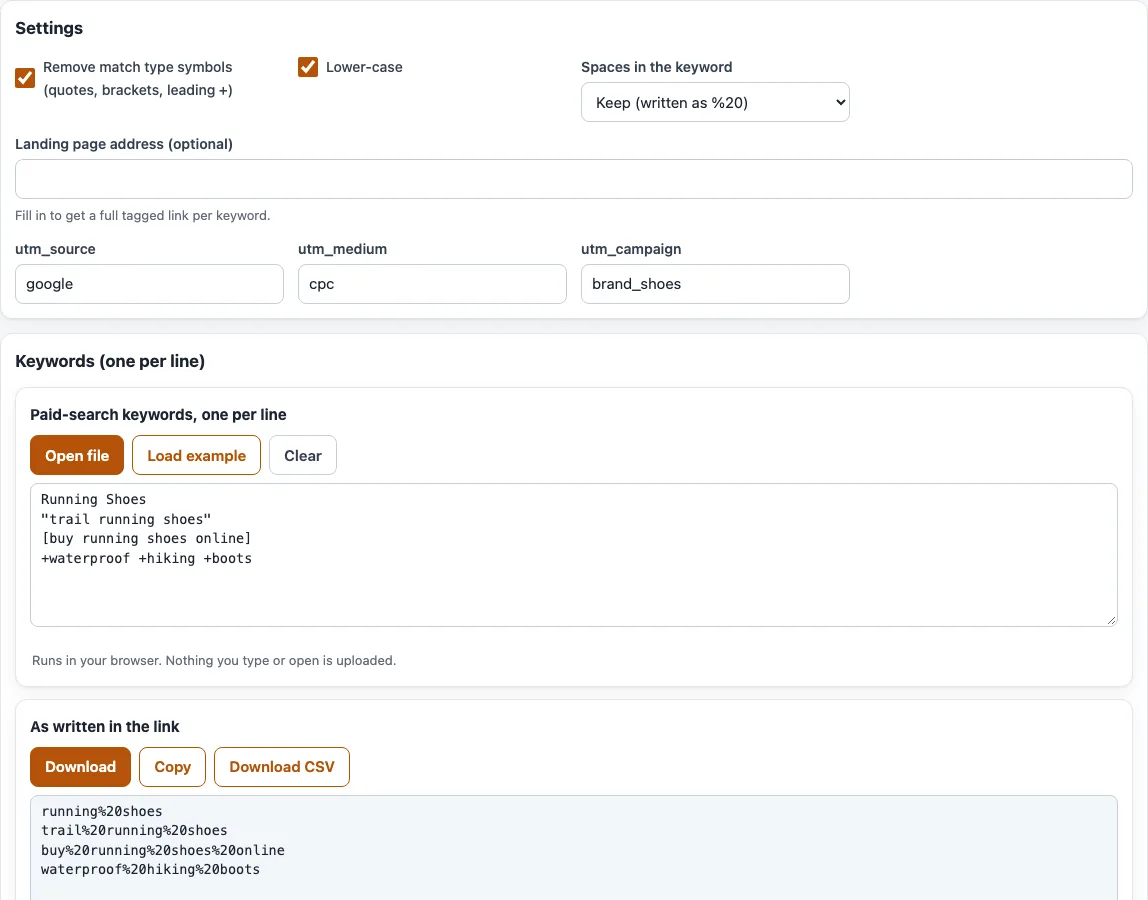
How to turn keywords into utm_term values
- Paste your keywords into the box labelled “Keywords (one per line)”. You can mix styles. The box starts with
Running Shoes,"trail running shoes",[buy running shoes online]and+waterproof +hiking +boots; “Open file” loads a text file and “Load example” brings the sample back. - Leave “Remove match type symbols (quotes, brackets, leading +)” on to strip those symbols from the value, or turn it off to keep and encode them.
- Leave “Lower-case” on to lower-case the values, or turn it off to keep your capitals.
- Choose an option under “Spaces in the keyword”: “Keep (written as %20)” is the default; the others are “Keep (written as +)”, “Dash (-)” and “Underscore (_)”.
- Optional: fill in “Landing page address (optional)” to get a full tagged link per keyword. The
utm_source(google),utm_medium(cpc) andutm_campaign(brand_shoes) fields are used for those links. - Read the table. Its columns are “Keyword”, “Match type”, “utm_term” and “In the link”. A repeated value is marked “Duplicate” instead of getting a “Copy” button.
- Use “Copy” or “Download” on the result, or “Download CSV”. The CSV has the columns keyword, match_type, utm_term and encoded, plus url when you entered an address.
The result box shows the value as written in the link, or the full tagged link when you added an address. Fix flagged duplicates before you download, so each keyword appears once in your list.
What is UTM term in Google Analytics?
utm_term is an optional UTM parameter that holds the paid keyword a click came from; Google’s GA4 help describes it as the “Paid keyword”. In a link it looks like ?utm_term=running%20shoes, next to utm_source and utm_campaign. GA4 reports it as the dimension “Session manual term”, and the Data API calls the first-user version firstUserManualTerm. When a visit has no UTM values, reports show “(not set)”.
UTM term examples
The tool detects the match type from how you write each keyword, then builds the value. With the default settings:
Running Shoes(broad, plain text) becomesrunning shoes, written in the link asrunning%20shoes."trail running shoes"(phrase) becomestrail running shoes.[buy running shoes online](exact) becomesbuy running shoes online.+waterproof +hiking +boots(broad match modifier) becomeswaterproof hiking boots.- With “Keep (written as +)”,
Running Shoesis written asrunning+shoes.
With a landing page https://a.com/ and the source, medium and campaign google, cpc and brand_shoes, the first keyword gives https://a.com/?utm_source=google&utm_medium=cpc&utm_campaign=brand_shoes&utm_term=running%20shoes.
Google Ads writes exact match as [keyword], phrase match as "keyword" and broad match modifier as +keyword (legacy). Broad match is plain text.
Should I keep brackets and quotes?
Usually remove them. They are match type notation, not part of what the person searched for, so the default setting strips them and the value reads as the keyword. The match type is still recorded in the “Match type” column and in the CSV.
If you keep them, they are percent-encoded: [buy shoes] becomes %5Bbuy%20shoes%5D and a quote becomes %22. A literal plus sign must be written %2B, because a bare + is read as a space.
Should I use %20 or + for spaces?
Either works, because the server reads both as a space. The tool defaults to %20. Pick one style, or a dash or underscore, and use it for every link.
Frequently asked questions
Can Google Ads fill utm_term automatically?
Yes, with a ValueTrack parameter in your tracking template. {keyword} is the ValueTrack parameter for the matched keyword, and {matchtype} returns one letter: b for broad, p for phrase or e for exact, and a for AI Max keywordless matches. The page links to “Let Google Ads fill utm_term in for you”, which leads to the Google Ads UTM parameters page.
What does “(not set)” mean in my reports?
The visit had no UTM value for that dimension. Check that your paid links include utm_term and were built correctly.
How do I see the match type of each keyword?
The table has a “Match type” column with Exact [ ], Phrase " “, Broad modifier + or Broad. The CSV repeats it in the match_type column.
Is utm_term required?
No. In GA4 utm_source, utm_medium and utm_campaign should always be set, and utm_term is optional. Use it when you want to compare paid keywords.
Does it work for keywords that are not from Google Ads?
Yes. It only reads the text you paste, so any keyword list works, for example one exported from another ad platform. Match type detection is based on Google Ads notation.
Does this tool upload my keywords?
No. Everything runs in your browser, so your keywords and links are never uploaded.
Related tools
- UTM parameters: what each UTM parameter does.
- UTM source: name the traffic source for each link.
- UTM medium: check medium values such as
cpcand the GA4 channel they land in. - UTM campaign: build consistent campaign names for your ads.
- UTM content: tag versions of an ad or links to the same page.
- Google Ads UTM parameters: final URL suffix and tracking template for Google Ads.
- UTM builder: create a complete tagged URL from all the UTM parameters.