UTM Tracking Audit and Naming Convention Checker
Paste or open a list of tagged URLs (up to 10,000) and get every UTM mistake, the values that break your naming rules, near-duplicate spellings, GA4 channel counts and a CSV report.
utm_ parameters to the end of a web address so analytics tools can report which source, medium and campaign brought a visit. This UTM tracking audit checks a whole list of tagged links at once: it finds mistakes in each link, tests the values against naming rules you set, and shows how each value is spelled across the list, so Email, email and e-mail show up together. You also get GA4 channel counts and a CSV report. It runs in your browser, is free and needs no sign-up. Your links are never uploaded, and the page never visits them. The box starts with 21 sample links so you can see the report before you paste your own.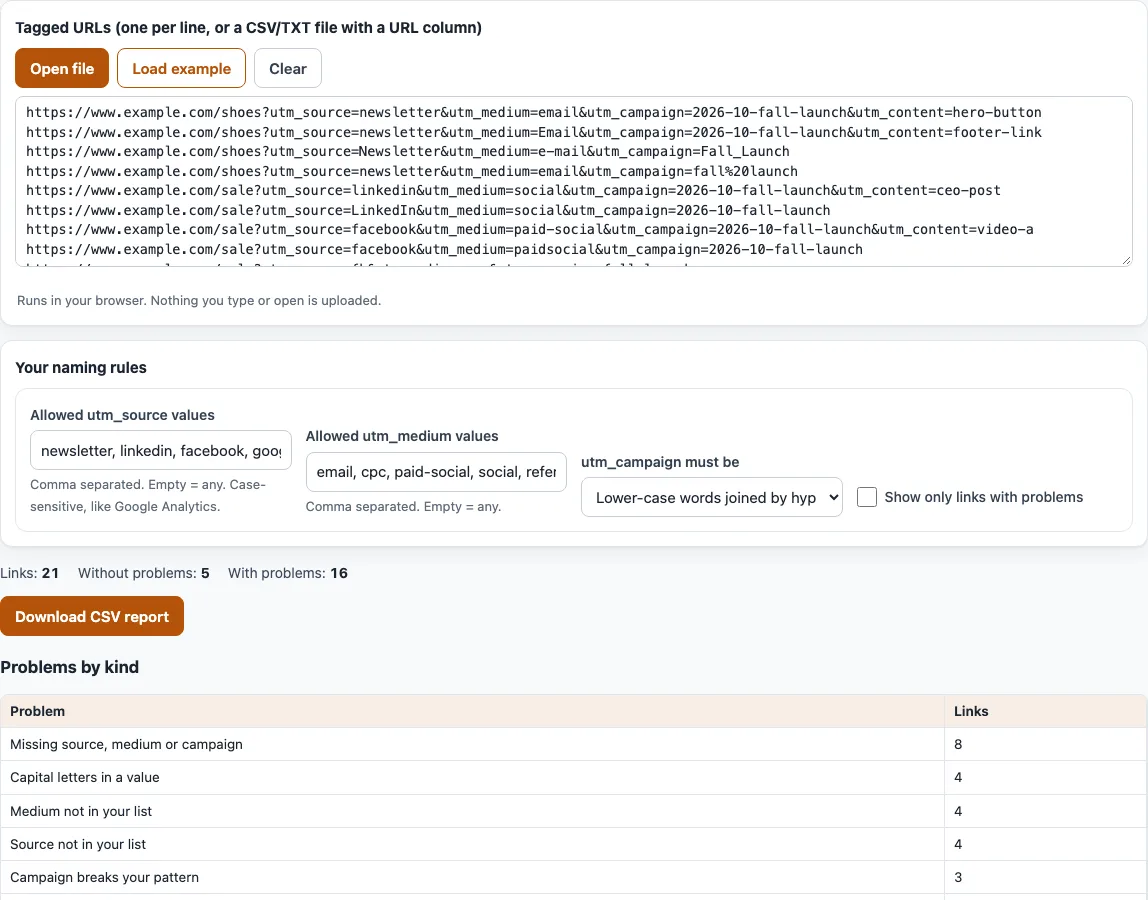
How to audit your UTM tracking links
- Paste your links into the box labelled “Tagged URLs (one per line, or a CSV/TXT file with a URL column)”, or use “Open file” for a TXT, CSV or TSV file. Up to 10,000 links are checked; extra links are counted and left out, with a message. Header lines are skipped.
- Keep the 21 sample links for a demo, or replace them.
- Under “Your naming rules”, list the sources you allow in “Allowed utm_source values”, separated by commas. Leave it empty to allow any source. Do the same for “Allowed utm_medium values”. Both lists are case sensitive, like Google Analytics.
- Choose “utm_campaign must be”: “Anything”, “Lower-case words joined by hyphens”, “Starts with YYYY-MM, then lower-case hyphen words” or “Matches my regular expression”. For your own expression a “Regular expression” field appears; it uses JavaScript syntax, and an invalid one is reported and not applied.
- Read the counts: “Links:”, “Without problems:”, “With problems:” and, if any, “Repeated URLs:”.
- Check “Problems by kind”, then “Values in use”. Values that differ only in capitals, hyphens, underscores or spaces are grouped and marked “n spellings of one value”.
- Look at “GA4 default channel of each link”, and tick “Show only links with problems” to narrow the list of links.
- Select “Download CSV report” to save every link with its channel and problems.
Your naming rules are kept in the page address. The table shows the first 300 links; the CSV includes all of them.
What is UTM tracking?
UTM tracking is adding tracking parameters to links so an analytics tool such as GA4 can attribute visits to a source, medium and campaign. Each parameter is a name and a value after a ?, such as utm_source=newsletter.
UTM tracking meaning: the parameters
utm_source says where the traffic comes from, utm_medium the kind of channel (such as email or cpc) and utm_campaign the campaign. utm_content and utm_term are optional. Google’s GA4 help says to always use utm_source, utm_medium and utm_campaign. A missing value shows as “(not set)” in reports, and if you set one UTM parameter you should set all the relevant ones. Values are case sensitive.
How does GA4 turn UTM values into channels?
Channel counts follow the manual-traffic rules of the default channel group. email, e-mail, e_mail and e mail all count as Email, even though reports list them as four different utm_medium values. A custom medium with no rule, such as qr-code, is Unassigned. In the sample list the channels are Email 8, Organic Social 3, Paid Social 3, Paid Search 2, Referral 2 and Unassigned 1.
What is a good UTM naming convention?
Use one set of lower-case values that everyone uses for the same thing. Google’s help says to use one consistent, lowercase naming convention and notes that SpringSale and Spring_Sale count as different values. A fixed list of sources and mediums and a campaign pattern, such as 2026-10-spring-sale, make mistakes easy to spot.
The hyphen style and the YYYY-MM prefix in this tool’s campaign options are suggestions of this tool, not Google or platform requirements. Choose one pattern, write it down and check each new list against it.
What does the sample audit show?
With the default rules the 21 sample links give 5 links without problems and 16 with problems. The most common problem is a missing source, medium or campaign (8), followed by capital letters (4), a source or medium that is not in your list (4 each) and a campaign that breaks the pattern (3). “Values in use” groups email (6), Email (1) and e-mail (1) as one value, and paid-social with paidsocial.
Frequently asked questions
What does this tool check in each link?
The same problems as the UTM link checker, such as missing parameters, capital letters, spaces and UTM written after #, plus three rule violations: a source not in your list, a medium not in your list and a campaign that breaks your pattern.
How do I find inconsistent UTM values?
Open “Values in use”. It lists the values of utm_source, utm_medium, utm_campaign, utm_content and utm_term with counts, and groups spellings of one value. Pick one spelling and update the links that use the others.
Why do my reports show email and Email as different mediums?
GA4 values are case sensitive, so each spelling is its own utm_medium value. The default channel group still counts email, e-mail, e_mail and e mail as Email. Use one spelling.
What happens with more than 10,000 links?
Only the first 10,000 are audited. The rest are counted and left out, and a message tells you how many.
Does the CSV report protect spreadsheets?
Yes. A value that starts with =, + or @ gets a leading ', so a spreadsheet does not run it as a formula.
Does the tool visit my links?
No. Everything runs in your browser. Links are never uploaded and never opened.
Related tools
- UTM link checker: decode and check one tagged link.
- UTM examples: sample links to compare with your own.
- Email UTM builder: tag every link in an email.
- UTM builder: build a new tagged link.
- UTM parameters: a plain explanation of each parameter.
- Google UTM and GA4 channels: see which GA4 channel your UTM links fall into.